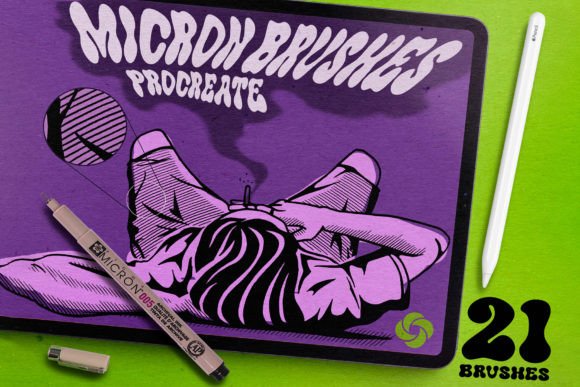
21 Micron Brushes for Procreate: Integrating Realistic Linework into Your Digital Workflow
In the evolving landscape of digital illustration, the gap between traditional media and tablet-based creation continues to narrow. For artists, designers, and content creators who rely on precision and texture, the 21 Micron Brushes for Procreate offer a sophisticated solution to a common problem: the sterile, uniform look of standard digital inking. This brush set is not merely a collection of tools; it is a workflow enhancer designed to immerse you in painting with a feeling of reality. By replicating the specific texture of real liners and their interaction with paper grain, these brushes allow professionals and hobbyists alike to achieve organic, tactile results without leaving the digital environment.
The Philosophy of Minimalist Toolsets
One of the most significant advantages of this specific brush pack is its curated approach. Many digital artists suffer from "tool fatigue," where an overload of similar brushes leads to decision paralysis and inconsistent line quality. The 21 Micron Brushes for Procreate set avoids this pitfall by refusing to bloat the library with dozens of variations of the same tool. Instead, it relies on the dynamic capabilities of the Apple Pencil and Procreate’s engine.
Rather than switching between ten different "thin" brushes, users are encouraged to adjust the size with pressure strength or the pen width adjustment slider. This method promotes muscle memory and consistency. When you master a single versatile liner, your workflow becomes faster and more intuitive. This design philosophy supports a streamlined creative process, allowing you to focus on composition and form rather than hunting for the right preset. Whether you are sketching a quick concept or rendering a detailed final piece, the ability to modulate line weight dynamically ensures that your stroke remains expressive and responsive to your hand movements.
Versatility Across Creative Disciplines
The utility of these brushes extends far beyond simple sketching. Because the set includes a diverse range of textures—from wet ink flows to dry, scratchy nibs—it adapts seamlessly to various professional needs. Here is how different creators can integrate these tools into their specific workflows:
- Illustrators and Concept Artists: Use the Sketcher Brush and Rough Inker for initial ideation. The jitter and texture provide a loose, energetic feel that helps break the perfectionism often associated with digital canvases.
- Comic Book Artists: The Best Comics Liner and Outliner Inker 2.0 are engineered for clarity and boldness. They maintain consistent opacity and edge definition, which is crucial for readable panel work and character outlines.
- Tattoo Designers: Precision is paramount in tattoo stencils. The Fine Liner Brush and Thin Liner Micron Liner Brush offer the sharp, clean lines necessary for creating templates that translate well to skin.
- Architectural and Technical Drafters: The Intense Binder and Dry Micron Pen provide the controlled, uniform strokes needed for technical drawings, where clarity outweighs artistic flair.
This cross-disciplinary applicability makes the bundle a high-value asset for freelancers and small business owners who may need to pivot between different visual styles for various clients. Instead of purchasing separate packs for comics, sketches, and technical diagrams, this single set covers the spectrum of linear needs.
Understanding the Brush Inventory
To maximize efficiency, it is essential to understand the specific role each brush plays within the 21 Micron Brushes for Procreate ecosystem. The set is divided into liners, binders, and textural tools, each serving a distinct phase of the artistic process.
The core liners, such as the Micron Liner Brush and Vintage Inker Brush, are your workhorses. They simulate the reliable flow of a physical fine-liner pen. For adding depth and shadow, the Stipple Brush, Detail Stipple Brush, and Stippler allow for gradual tonal buildup. This technique, known as stippling, is time-consuming traditionally but becomes highly efficient digitally when paired with responsive brushes. It adds a classic, engraved look to illustrations that flat coloring cannot achieve.
For those seeking a more painterly or experimental edge, the Wet Micron Brush and Jitter Binder introduce controlled irregularity. These tools are excellent for breaking up rigid lines and adding organic warmth to digital pieces. The Copic Brush bridges the gap between lining and coloring, offering a softer edge that mimics alcohol markers, making it ideal for blending zones or soft shading within line art.
Implementation and Installation Process
Integrating new assets into your digital studio should be frictionless. The installation process for this brush set is designed to be immediate, ensuring you can start creating without technical hurdles. After purchase, you will receive a download link for the file. The process is straightforward:
- Download the file directly to your iPad.
- Open the downloaded file using the Procreate app.
- The brush set will automatically install and appear in your brush library, ready for use.
This simplicity is crucial for maintaining creative momentum. If you encounter any issues during installation, support is available to resolve them quickly. It is important to note that these brushes are optimized exclusively for Procreate on iPad. They leverage the specific pressure sensitivity and tilt recognition of the Apple Pencil, meaning they will not function as intended on other platforms or software. Ensuring your hardware and software are up to date will guarantee the best performance and texture fidelity.
Workflow Integration Tips
To get the most out of this bundle, consider how these brushes interact with other layers and settings in Procreate. For example, when using the Dry Micron Pen for sketching, try lowering the layer opacity before beginning your final inks on a new layer above. This allows you to trace over your rough ideas with the precision of the Fine Liner Brush while maintaining the structural integrity of your initial concept.
Combining brushes is another powerful technique. You might start with the Round Liner for primary contours and switch to the Stipple Brush for shading within the same line art layer. Because the textures are designed to complement each other, the transition feels natural rather than disjointed. This cohesion is vital for maintaining a professional polish in your final output.
Furthermore, experiment with the streamlining settings in Procreate alongside these brushes. While the brushes themselves have built-in texture, adjusting global streamlining can help smooth out jitters if you are working on long, sweeping curves with the Outliner Inker 2.0. Conversely, turning streamlining off can enhance the raw, hand-drawn feel of the Sketcher Brush.
Long-Term Value for Professionals
For entrepreneurs, educators, and serious hobbyists, the value of a tool lies in its longevity and adaptability. The 21 Micron Brushes for Procreate are built to remain relevant regardless of shifting artistic trends. The fundamental need for clean, textured linework does not change, even as styles evolve. By mastering this set, you invest in a skill set that translates across projects.
Moreover, the consistency provided by these brushes aids in brand identity for commercial artists. If you produce a series of illustrations or educational materials, using the same core set of liners ensures a unified visual language. This consistency builds recognition and trust with your audience or clients. Whether you are creating zines, designing logos, illustrating children's books, or drafting architectural concepts, the reliability of these tools supports a professional standard of quality.
In conclusion, this brush set is more than a digital commodity; it is a partner in your creative process. It respects the tradition of analog drawing while leveraging the efficiency of digital technology. By focusing on texture, versatility, and ease of use, it empowers artists to immerse themselves fully in their work, producing results that feel authentic, tangible, and distinctly human.