Color Pencils Procreate Brushes: Bringing Traditional Texture to Your Digital Canvas
There is a distinct tactile satisfaction in dragging a wax-based colored pencil across grainy paper. The resistance, the subtle layering of pigment, and the way colors blend imperfectly create an organic warmth that digital tools often struggle to replicate. For many artists, switching to a tablet feels like losing that soulful connection to the medium. This is where Color Pencils Procreate Brushes change the game. By integrating this specialized set into your workflow, you bridge the gap between analog nostalgia and digital convenience, allowing you to create artwork that feels hand-crafted rather than computer-generated.
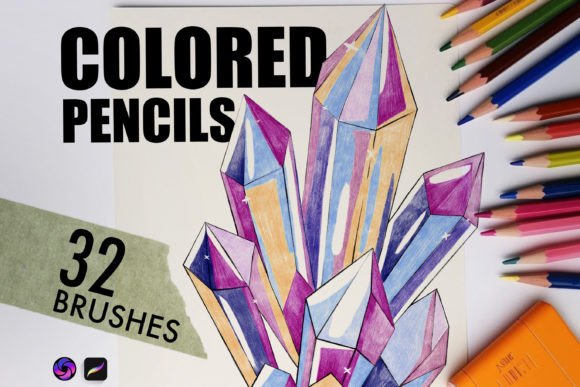
The core appeal of these brushes lies in their ability to mimic the physical properties of traditional media. Unlike standard digital pencils that produce flat, uniform lines, this collection emulates the texture and strokes of various colored pencils and crayons. It is not just about adding a filter; it is about replicating the behavior of the tool itself. Whether you are sketching quick concepts or rendering detailed illustrations, having access to authentic textures can significantly elevate the perceived value and emotional impact of your work.
Why Authentic Texture Matters in Digital Art
In a saturated digital landscape, standing out requires more than just technical proficiency. Viewers and clients are increasingly drawn to art that feels human. When you use Color Pencils Procreate Brushes, you introduce controlled imperfections that signal human involvement. The grain of the paper, the slight variation in stroke opacity, and the waxy buildup all contribute to a sense of depth and realism.
This authenticity is particularly crucial for professionals who need to present work that feels approachable and warm. A corporate illustration rendered with sterile, vector-like precision might feel cold, whereas the same concept drawn with textured pencil strokes feels inviting and thoughtful. These brushes allow you to retain the speed and editability of digital art while delivering the aesthetic charm of traditional drawing.
Real-World Applications for Creators and Professionals
The versatility of this 32-brush collection means it serves a wide array of users beyond just fine artists. Here is how different professionals can leverage these tools in their daily workflows.
Children’s Book Illustrators and Educators
For those creating content for younger audiences, softness and vibrancy are key. The inclusion of three specific blending brushes in this set allows illustrators to achieve smooth gradients and soft transitions without the harsh edges typical of digital painting. An educator creating visual aids for history or science lessons can use the harder pencil variants to create diagrammatic sketches that look like they were drawn in a notebook, making complex information feel more accessible and less intimidating.
Brand Designers and Marketers
Small business owners and marketers often need to create social media graphics that stop the scroll. Hand-drawn elements convey trust and craftsmanship. Using the Color Pencils Procreate Brushes, a marketer can quickly sketch product mockups or create infographic elements that stand out against the sea of polished stock photography. The two bonus seamless paper texture brushes are particularly useful here, allowing designers to add a subtle background grain that makes digital posts feel tangible and premium.
Hobbyists and Journal Keepers
Digital journaling has surged in popularity, but many users miss the feel of bullet journals created with pen and paper. This brush set enables hobbyists to maintain their creative practice on an iPad without carrying physical supplies. You can sketch daily reflections, plan meals, or track habits with the same satisfying scratchiness of a real pencil. The variety of hardness levels means you can switch from light sketching to bold highlighting seamlessly, mirroring the experience of using a physical pencil case.
Understanding the Brush Mechanics
To get the most out of these tools, it helps to understand what makes them tick. The set includes a diverse range of 32 brushes, each calibrated to emulate specific characteristics. The varying degrees of hardness are not just aesthetic choices; they dictate how you build up color. Harder pencils are ideal for initial sketches and fine details, holding their shape even when pressed firmly. Softer pencils deposit more pigment quickly, perfect for filling in large areas or creating rich, dark shadows.
The blending brushes are perhaps the most transformative feature. In traditional media, blending colored pencils often requires a solvent or a colorless blender pencil. Here, the digital blending brushes simulate that waxy smudge effect, allowing you to soften edges and mix colors directly on the canvas. This adds a playful and vibrant element to your artwork, enabling techniques like scumbling and burnishing that are hallmarks of high-quality colored pencil art.
Considerations Before You Start
While these brushes are powerful, they require a shift in mindset if you are used to standard digital painting. Because they emulate real media, they rely heavily on layering. You cannot simply pick a color and fill an area instantly; you must build up tones gradually, just as you would on paper. This can be slower, but the result is far more nuanced.
Additionally, consider your hardware. While Procreate is optimized for performance, using highly textured brushes with complex grain patterns can be demanding on older devices. Ensure your iPad is updated to the latest compatible version of Procreate to experience the full responsiveness of the pressure sensitivity and tilt features. These brushes are designed to react to how hard you press and the angle at which you hold the stylus, so taking time to calibrate your Apple Pencil settings will yield better results.
Integrating Textures for Depth
One often-overlooked aspect of realistic digital art is the surface it sits on. Drawing on a pure white, pixel-perfect screen can make even the best brushstrokes look floating and disconnected. The two bonus seamless paper textures included in this set solve this problem. By applying a subtle paper grain underneath your drawing layer, you give the pigment something to "catch" on. This interaction between the brush texture and the paper texture creates a cohesive look that tricks the eye into seeing physical media.
When using these textures, experiment with blending modes. Setting the paper texture layer to "Multiply" or "Overlay" at low opacity can add just enough grit without overpowering your colors. This small step often makes the difference between a good digital drawing and one that looks indistinguishable from a scan of a traditional piece.
Final Thoughts on Enhancing Your Workflow
Adopting Color Pencils Procreate Brushes is not about abandoning digital efficiency; it is about enriching your creative palette. Whether you are a freelancer looking to offer a unique style to clients, a teacher making engaging materials, or an artist seeking to reconnect with the joy of drawing, this collection offers a practical solution. It removes the barrier between your intent and the output, allowing the natural quirks of hand-drawing to shine through. By understanding the nuances of hardness, blending, and texture, you can transform your digital canvas into a space that feels as alive and responsive as a sketchbook on your desk.