Cloud Photoshop Brushes for Digital Art
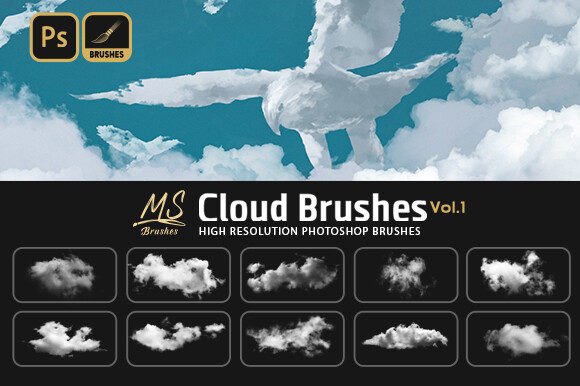
Digital sky painting often presents a unique challenge. While traditional media allows artists to blend pigments naturally, replicating the soft, ethereal edges of cumulus or stratus formations in software can feel rigid and time-consuming. This is where specialized tools become essential. Cloud Photoshop Brushes offer a streamlined solution, providing pre-textured stamps that mimic the organic complexity of atmospheric phenomena. By integrating these assets into your workflow, you shift focus from tedious pixel-pushing to composition and lighting, allowing for faster iteration and more realistic results.
This specific collection includes 25 high-resolution brushes designed to cover a wide spectrum of cloud types. Whether you are aiming for stormy drama or serene clarity, having a versatile library at your disposal changes how you approach landscape design, photo manipulation, and digital illustration. The value lies not just in the images themselves, but in the flexibility they offer across different skill levels and professional requirements.
Why Versatility Matters in Digital Assets
One of the most significant advantages of this pack is its broad compatibility. It is not limited to a single ecosystem. The files work seamlessly with Adobe Photoshop CS2 through CC, GIMP, Procreate 5.0, and Affinity Photo. This cross-platform support is crucial for modern creators who may switch between desktop and tablet environments or prefer open-source alternatives. For instance, a freelancer might draft concepts on an iPad using Procreate during a commute and finalize details in Photoshop on their workstation. Knowing that the same brush set functions consistently across these platforms ensures a cohesive workflow without the need to convert or recreate assets.
The inclusion of two ABR files specifically tailored for Photoshop versions ensures that legacy users are not left behind, while the PDF guide on importing brushes into GIMP, Procreate, and Affinity Photo lowers the barrier to entry for those less familiar with file management. This attention to technical detail reflects a understanding of the diverse tools artists use today.
The Beginner and Hobbyist
For those new to digital art, the learning curve can be steep. Understanding pressure sensitivity, opacity flow, and layer blending modes takes time. Cloud Photoshop Brushes serve as an educational tool as much as a creative one. By using pre-made shapes, beginners can study how light interacts with volume. They can experiment with overlay and screen blending modes to see how clouds integrate with background skies without struggling to paint the basic form from scratch. This immediate gratification helps maintain motivation and encourages further exploration of digital techniques.
Hobbyists often prioritize ease of use and fun over commercial perfection. Having a set of 25 varied options means they can quickly add atmosphere to personal projects, such as greeting cards or social media posts, without spending hours on a single element. The practical value here is speed and enjoyment.
The Professional Illustrator and Concept Artist
Professionals operate under tight deadlines and client expectations. For a concept artist working on environment design, speed is currency. These brushes allow for rapid blocking-in of skyboxes. Instead of painting every wisp of vapor, the artist can lay down base shapes and then refine them. The high resolution ensures that even when zoomed in for detailed work, the edges remain crisp and natural, avoiding the pixelation that plagues lower-quality assets.
Reliability and quality are the primary metrics for this group. They need to know that the brushes will behave predictably. The variety within the set—ranging from fluffy cumulus to wispy cirrus—provides the flexibility needed to match different moods and weather conditions in narrative-driven artwork. The ability to customize the brush dynamics further allows professionals to tailor the tool to their specific style, making it a long-term asset rather than a one-time shortcut.
Photographers and Photo Manipulators
Photo editors often face the task of replacing bland, overexposed skies with more dramatic alternatives. While stock photos are an option, they rarely match the perspective and lighting of the original image perfectly. Using Cloud Photoshop Brushes allows for a composite approach. Editors can paint in clouds that align with the vanishing point and light source of the foreground subject. This method offers greater control over density and placement than simply pasting a new sky layer.
For marketers and small business owners creating promotional materials, this capability is invaluable. A product shot against a dull gray sky can be transformed into an aspirational image with a vibrant, cloud-filled backdrop. The cost-effectiveness of buying a brush pack versus commissioning a reshoot or purchasing multiple high-end stock licenses makes this a smart financial decision for entrepreneurs managing their own branding.
Educators and Content Creators
Teachers and tutorial creators need resources that are easy to explain and demonstrate. The included PDF guide on how to import brushes into various software packages is a significant benefit here. Educators can recommend this pack to students regardless of whether they use paid or free software, ensuring equitable access to learning materials. Furthermore, bloggers and YouTubers creating content about digital art can use these brushes to create engaging thumbnails and header images quickly, maintaining a consistent visual brand without extensive design overhead.
Evaluating Fit for Your Workflow
Deciding whether this tool matches your needs involves assessing your current priorities. If your primary concern is absolute artistic purity and you prefer building every texture from a blank canvas, you might find pre-made brushes limiting. However, if you value efficiency, consistency, and versatility, this set offers substantial benefits.
Consider the following factors:
- Project Type: Are you creating realistic landscapes, fantasy scenes, or graphic designs? The variety in this set supports all three, but realistic renderings benefit most from the high-resolution details.
- Software Ecosystem: Do you work exclusively in one program, or do you switch between devices? The multi-platform compatibility ensures you are not locked into a single vendor.
- Skill Level: Beginners gain confidence through immediate results, while experts save time on repetitive tasks. Both groups find value, though for different reasons.
- Commercial Use: Check the license terms, but generally, such assets are intended to enhance original works. Ensure that the final output is a transformative creation rather than just the raw brush stamp.
Practical Application Tips
To get the most out of these Cloud Photoshop Brushes, consider adjusting the color dynamics and scattering settings in your software. Clouds are rarely pure white; they reflect the colors of the sunset, the blue of the sky, and the shadows of the earth. By sampling colors from your background and applying them with low flow, you can integrate the brush strokes seamlessly.
Layering is also key. Start with larger, softer brushes for the base mass, then use smaller, sharper tips for the illuminated edges. This technique mimics the way light penetrates cloud structures, adding depth and realism. For users of GIMP or Affinity Photo, referring to the provided PDF will help navigate any interface differences, ensuring a smooth setup process.
Ultimately, the goal of any digital tool is to remove friction between your idea and its execution. By providing a reliable, high-quality, and compatible set of atmospheric elements, this brush pack serves as a bridge for creators across the spectrum. Whether you are a student learning the basics of light, a professional meeting a deadline, or a hobbyist enjoying a creative evening, these tools adapt to your intent, enhancing your ability to communicate vision through digital media.