Evaluating Underwater Photoshop Brushes for Digital Art and Photo Manipulation
Digital artists and photo editors often face the challenge of creating convincing aquatic environments. Whether working on fantasy illustrations, marine biology visualizations, or commercial advertising, achieving realistic water effects requires more than just basic color adjustments. This is where specialized tools like Underwater Photoshop Brushes become essential assets in a designer’s toolkit. These digital resources are designed to simulate the complex interplay of light, fluid dynamics, and particulate matter found beneath the surface.
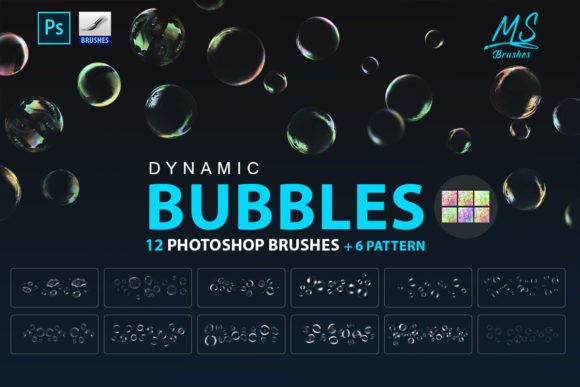
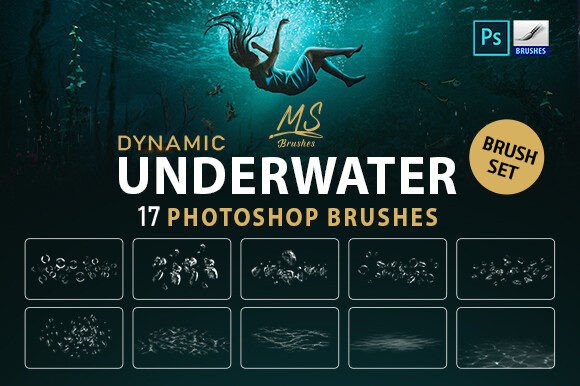
The specific set under discussion includes 17 high-quality dynamic brushes intended to replicate bubbles, ripples, and refraction lights. Unlike static stamps, dynamic brushes respond to pressure and movement, allowing users to "paint" with these elements rather than simply pasting them. This article explores the functionality, benefits, and practical considerations of using such a brush set to help you determine if it aligns with your creative workflow.
Understanding the Core Functionality
At its core, this collection provides pre-configured brush tips that mimic underwater phenomena. The set is divided into two primary file formats to ensure compatibility across different software versions. Users receive two ABR files: one optimized for Photoshop CS6 and above, supporting sizes up to 5000 pixels, and another for older versions like Photoshop CS2, with sizes up to 2500 pixels. This distinction is crucial for professionals who may be working within legacy systems or those who require ultra-high-resolution outputs for large-format printing.
Beyond the brush files themselves, the package includes educational support materials. A video tutorial demonstrates practical application techniques, while PDF guides cover installation procedures for various platforms, including Photoshop, GIMP, Procreate, and Affinity Photo. This multi-platform support indicates that the brushes are likely standard image-based stamps or shapes, making them versatile for users who do not rely exclusively on Adobe products.
Why Artists Choose Specialized Water Brushes
Creating realistic water effects from scratch is time-consuming. It involves understanding physics, such as how light bends when entering water (refraction), how air pockets rise (bubbles), and how surface tension creates disturbances (ripples). Manually painting these elements requires advanced skill and significant hours of work. Underwater Photoshop Brushes offer a shortcut without necessarily sacrificing quality, provided they are used correctly.
The primary benefit is efficiency. By using pre-made assets for bubbles and light rays, artists can focus on composition and storytelling rather than getting bogged down in repetitive detailing. Furthermore, dynamic brushes allow for variation. Since each stroke can differ based on tablet pressure and speed, the resulting artwork avoids the robotic, repetitive look often associated with simple copy-paste methods.
Practical Applications and Ideal Use Cases
This toolset is particularly well-suited for specific types of projects. Photo manipulators who composite subjects into aquatic backgrounds will find the refraction light brushes invaluable for blending foreground and background elements seamlessly. Similarly, concept artists working on underwater scenes in video games or films can use these brushes to quickly block out atmospheric effects before moving to detailed rendering.
The inclusion of high-resolution options (up to 5000px) makes this set viable for print media. Designers creating book covers, posters, or packaging for marine-related products can utilize these brushes to add texture and depth without worrying about pixelation. The ability to install these brushes in Procreate also opens up possibilities for illustrators who prefer working on iPads, allowing for a more intuitive, hand-drawn approach to digital water effects.
Tradeoffs and Considerations
While convenient, relying on preset brushes comes with tradeoffs. The most significant consideration is the risk of uniformity. If an artist uses the same bubble brush repeatedly without adjusting opacity, size jitter, or scattering settings, the artwork can look artificial. Real underwater environments are chaotic; bubbles vary in size, clarity, and speed. Therefore, these brushes should be viewed as building blocks rather than complete solutions.
Another factor is software compatibility. While the provider lists support for GIMP, Procreate, and Affinity Photo, the native integration might not be as seamless as it is in Photoshop. For instance, dynamic features that rely on specific Photoshop engine capabilities may behave differently in other programs. Users of non-Adobe software should test the brushes thoroughly to ensure they meet their expectations regarding responsiveness and customization.
Additionally, the resolution limit of 2500px for the older CS2-compatible file may be insufficient for modern high-DPI displays or large-scale prints. Professionals working exclusively in newer environments should stick to the CS6+ version to maximize quality.
Installation and Learning Curve
One of the strengths of this product is the emphasis on usability through included documentation. For beginners, installing custom brushes can be a daunting technical hurdle. The provided PDF file simplifies this process by offering step-by-step instructions for multiple applications. This lowers the barrier to entry, making the set accessible to hobbyists and students who may not have extensive technical knowledge.
The video tutorial is equally important. It bridges the gap between having the tool and knowing how to use it effectively. Watching an experienced artist demonstrate how to layer refraction lights over a subject or how to vary bubble density can provide insights that static images cannot. This educational component adds significant value, transforming the product from a simple asset pack into a mini-course on underwater digital painting techniques.
Making the Decision: Is This Set Right for You?
To determine if these Underwater Photoshop Brushes are a good fit for your needs, consider your current workflow and project requirements. If you frequently create aquatic scenes and find yourself spending excessive time painting individual bubbles or light rays, this set offers a logical solution to streamline your process. The dynamic nature of the brushes supports a natural, organic look that static stamps cannot achieve.
However, if you are a purist who prefers to paint every element from scratch to maintain total artistic control, or if you work primarily in 3D software where water effects are generated via simulation, these brushes may offer limited utility. Similarly, if you require vector-based scalability for infinite resizing without quality loss, raster-based brushes will not meet your needs.
Ultimately, this set represents a balance between convenience and quality. It provides high-resolution, versatile tools backed by instructional support, making it a strong candidate for digital painters, photo editors, and illustrators looking to enhance their underwater compositions efficiently. By integrating these brushes into your workflow, you can reduce production time while maintaining a professional standard of realism, provided you take the time to master their dynamic properties.