Lightning Photoshop Brushes: Electrify Your Digital Art with Realistic Effects
In the dynamic world of digital art, lighting is often the difference between a flat composition and a masterpiece that commands attention. Among the most challenging elements to render manually are electrical effects. Capturing the raw energy, unpredictability, and luminosity of lightning requires not only technical skill but also significant time investment. This is where Lightning Photoshop Brushes become an indispensable tool for creators. Designed to streamline the workflow of photographers, illustrators, and graphic designers, this collection offers a practical solution for adding high-impact electrical effects without the steep learning curve of manual painting.
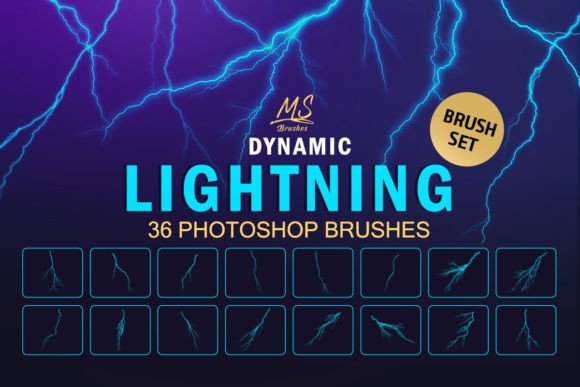
Lightning Photoshop Brushes is a curated set of 36 high-quality brushes specifically engineered to create stunning lightning effects in your digital artworks. Whether you are aiming for photorealism or stylized fantasy, these tools provide the versatility needed to enhance your visual storytelling. By integrating these assets into your toolkit, you can transform ordinary images into dramatic scenes filled with power and atmosphere.
Overcoming the Challenges of Rendering Electricity
For many digital artists, creating convincing lightning from scratch is a daunting task. The natural phenomenon is chaotic, branching in unpredictable patterns while emitting intense light that affects the surrounding environment. Manually painting these elements often results in stiff, unnatural lines that break the viewer’s immersion. Furthermore, achieving the correct glow and transparency levels to make the lightning look integrated rather than pasted on top requires advanced knowledge of layer blending modes and masking techniques.
The primary goal for most artists using these tools is efficiency without sacrificing quality. You need a resource that allows you to focus on composition and mood rather than getting bogged down in the minutiae of drawing every individual spark. Lightning Photoshop Brushes addresses this need by providing pre-rendered, high-resolution stamps that mimic the organic complexity of electrical discharges. This allows you to bypass the tedious initial sketching phase and move directly to placement and refinement.
Versatility Across Genres and Styles
One of the standout features of this brush set is its adaptability. While the name suggests a focus on stormy weather, the applications extend far beyond meteorological accuracy. The 36 unique brushes include variations suitable for a wide range of creative projects:
- Realistic Storms: Create breathtaking landscape photography edits featuring jagged bolts striking through dark clouds. The varying opacity and shape of the brushes allow for layered effects that simulate distance and intensity.
- Sci-Fi and Cyberpunk: Use the sharper, more geometric sparks to design futuristic interfaces, malfunctioning robots, or energy weapons. These elements add a technological edge to concept art and game assets.
- Fantasy and Magic: Soften the edges and adjust the color hues to craft magical spells, enchanted staffs, or supernatural auras. The brushes can be easily recolored to match fire, ice, or arcane energy themes.
- Horror and Thriller: Add erratic, flickering flashes to create tension in dark, moody compositions. Subtle electric currents can suggest danger or unstable environments.
This versatility ensures that Lightning Photoshop Brushes remains relevant regardless of your niche. Whether you are designing a movie poster, a book cover, or social media graphics, the ability to quickly generate credible electrical effects expands your creative possibilities.
Practical Implementation and Workflow Integration
Integrating new assets into your existing workflow should be seamless. Lightning Photoshop Brushes is compatible with Photoshop CS2 and above, ensuring that both legacy users and those on the latest Creative Cloud subscriptions can utilize them effectively. The installation process is straightforward, and the package includes a comprehensive PDF guide. This documentation is particularly valuable for beginners who may be unfamiliar with importing custom brush sets, offering step-by-step instructions to get you started immediately.
To achieve the best results, consider the following practical tips when using these brushes:
- Layer Management: Always apply lightning effects on a new layer. This non-destructive approach allows you to adjust opacity, blending modes, and position without altering the original image.
- Blending Modes: Experiment with blending modes such as "Screen," "Linear Dodge (Add)," or "Color Dodge." These modes help the bright white or colored lightning interact naturally with the darker backgrounds, creating a realistic glow.
- Color Customization: Do not limit yourself to white or blue. Use the Hue/Saturation adjustment layer clipped to your lightning layer to change the color temperature. Purple lightning can suggest magic, while red might indicate danger or heat.
- Scaling and Rotation: Each of the 36 brushes has a unique shape. Rotate and scale them to fit the perspective of your scene. A lightning bolt striking in the distance should be smaller and softer than one striking in the foreground.
Tailoring the Approach to Your Skill Level
Different users will approach Lightning Photoshop Brushes in different ways, depending on their experience and project requirements. For novice designers, these brushes serve as an educational tool. By observing how the pre-made shapes interact with light and shadow, beginners can learn principles of lighting and composition. The included PDF guide further supports this learning curve, ensuring that even those new to Photoshop can achieve professional-looking results.
For seasoned professionals, the value lies in speed and consistency. In a commercial setting, time is money. Being able to generate a complex lightning effect in seconds rather than hours allows for faster iteration and client approvals. Professionals can use the brushes as a base, then refine them with additional masking and painting to create unique, bespoke effects that stand out in a crowded market.
Enhancing Visual Impact and Storytelling
Ultimately, the purpose of any digital asset is to serve the narrative. Lightning is a powerful visual metaphor for energy, chaos, power, and revelation. By using Lightning Photoshop Brushes, you are not just adding decoration; you are directing the viewer’s eye and establishing the mood of your piece. A well-placed flash can highlight a subject, create depth, or suggest an unseen force at work.
Consider the context of your artwork. In a dramatic stormy scene, the lightning should feel threatening and overwhelming. In a sci-fi image, it might feel controlled and precise. In a fantasy piece, it could feel whimsical and ethereal. The high quality of these 36 brushes ensures that they retain their clarity and impact even when scaled, allowing you to maintain the integrity of your vision across various output sizes, from web banners to large-format prints.
Conclusion
Adding electrifying touches to your projects no longer needs to be a technical hurdle. Lightning Photoshop Brushes offers a robust, user-friendly solution for artists seeking to elevate their digital work. With 36 high-quality options, broad compatibility, and practical guidance, this set empowers you to explore new creative territories. Whether you are crafting a futuristic cityscape or a mythical battle scene, these tools provide the spark needed to bring your imagination to life. Invest in your creative toolkit today and discover how easy it is to master the art of digital lightning.