Evaluating Texture Fill Brushes Procreate X 20 for Digital Artists
In the evolving landscape of digital illustration, the gap between traditional media aesthetics and tablet-based workflows continues to narrow. Artists are no longer satisfied with sterile, vector-like perfection; instead, there is a growing demand for organic imperfection, tactile depth, and visual noise. This is where specialized toolsets like Texture Fill Brushes Procreate X 20 enter the conversation. Designed specifically for creators who prioritize grainy, hand-drawn aesthetics, this brush pack offers a curated selection of twenty distinct tools aimed at transforming flat color fields into rich, textured compositions.
For professionals, freelancers, and serious hobbyists alike, understanding the utility of such assets is crucial. It is not merely about acquiring more brushes, but about integrating tools that streamline workflow while enhancing artistic expression. This analysis explores the practical application, technical flexibility, and real-world value of this specific brush set within the Procreate ecosystem.
The Core Functionality and Design Philosophy
The primary appeal of Texture Fill Brushes Procreate X 20 lies in its dual-purpose design. Unlike standard painting brushes that require a base layer of flat color before texture can be applied, many brushes in this pack are engineered to function as dynamic painting tools from the start. This means an artist can lay down color and texture simultaneously, significantly reducing the number of layers and steps required in a typical illustration process.
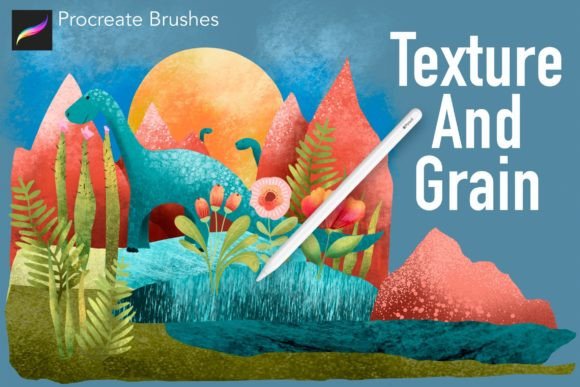
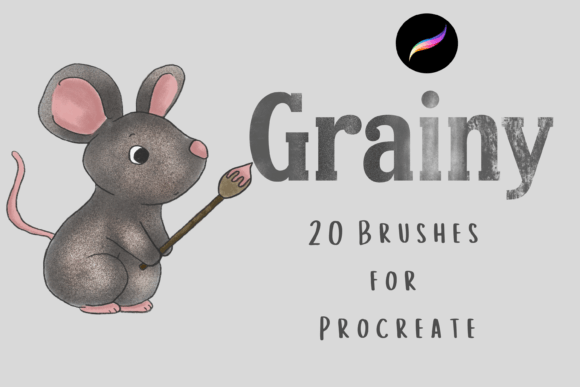
The collection focuses heavily on grainy and grungy textures. These are not subtle, barely-there effects; they are pronounced, character-rich marks that mimic the behavior of dry media, such as charcoal, pastel, or rough paper stock. The inclusion of both standalone painting brushes and overlay-specific tools provides versatility. An illustrator might use the dynamic brushes for initial sketching and blocking in shapes, then switch to the overlay variants to add cohesive atmospheric noise across the entire piece.
Flexibility Through Blend Modes and Customization
One of the most significant technical strengths of this pack is its compatibility with varying blend modes. While the brushes come with default settings optimized for immediate use, their true potential is unlocked when users experiment with layer interactions. For instance, using a grainy brush on a "Multiply" layer can deepen shadows with texture, while applying it on "Overlay" or "Soft Light" can introduce mid-tone complexity without obscuring underlying details.
Furthermore, the ability to resize and recolor these brushes ensures they adapt to diverse project requirements. Whether working on a small social media graphic or a large-format print, the scalability of the brush tips maintains integrity. This flexibility is essential for professionals who must maintain consistent branding or stylistic choices across different mediums and resolutions.
Practical Applications in Professional Workflows
To understand the value of Texture Fill Brushes Procreate X 20, it is helpful to consider specific use cases where these tools excel. The following scenarios highlight how different creative professionals might integrate this asset into their daily operations:
- Editorial Illustration: Editors often seek artwork that feels human and approachable. The grungy, hand-drawn quality of these brushes helps break up the digital coldness, making illustrations feel more akin to print magazine spreads.
- Brand Identity and Marketing: Small business owners and marketers looking to convey authenticity can use these textures in background elements, packaging designs, or social media posts. The grain adds a premium, artisanal feel that resonates with modern consumers.
- Concept Art and Storyboarding: Speed is critical in early-stage development. The dynamic nature of these brushes allows concept artists to block out environments and characters with immediate textural context, avoiding the need for separate texture passes in later stages.
- Digital Scrapbooking and Zine Culture: Creators in the publishing and zine space benefit from the instant download format and the aesthetic alignment with analog collage techniques. The brushes replicate the look of torn paper, ink bleeds, and photocopy distortion.
Assessing Quality and Usability
When evaluating any digital asset, consistency and reliability are paramount. A common frustration with free or low-quality brush packs is erratic stroke behavior, unexpected opacity drops, or poor pressure sensitivity response. Texture Fill Brushes Procreate X 20 appears to address these issues by offering stable performance across different iPad models and Apple Pencil generations.
The "hand-drawn" descriptor is accurate; the textures do not look like repetitive computer-generated patterns. Instead, they exhibit the natural variation found in physical media. This organic quality prevents the "tiling" effect that plagues lesser texture tools, ensuring that large areas of color remain visually interesting without appearing artificial.
Usability is further enhanced by the intuitive organization of the pack. With twenty brushes, the set is concise enough to avoid overwhelming the user yet comprehensive enough to cover a wide range of textural needs. Users are not forced to sift through hundreds of redundant options, allowing for quicker decision-making during the creative process.
Potential Limitations and Considerations
While the pack offers significant value, it is important to acknowledge its specific niche. Artists seeking hyper-realistic rendering tools or smooth, airbrushed gradients will find these brushes unsuitable for their primary needs. The heavy emphasis on grain and grit means they are specialized tools rather than all-purpose solutions.
Additionally, because the brushes rely on texture, they may require adjustment when used at extremely small scales. Fine details can sometimes get lost if the grain size is too large relative to the canvas resolution. Users should test the brushes at their intended output size to ensure the texture enhances rather than obscures the subject matter.
Who Benefits Most from This Toolset?
The ideal user for Texture Fill Brushes Procreate X 20 is someone who already possesses a foundational understanding of digital painting principles but seeks to elevate the tactile quality of their work. This includes:
- Freelance Illustrators: Who need to differentiate their style in a crowded market by offering unique, textured aesthetics.
- Educators and Workshop Leaders: Who can use these brushes to teach students about the importance of texture and value in composition.
- Hobbyists Transitioning to Professional Work: Who want to bridge the gap between amateur digital art and professional-grade finishes without investing in complex software plugins.
For these groups, the instant download nature of the product provides immediate access, allowing for rapid integration into existing libraries. The lack of subscription fees or ongoing costs makes it a low-risk investment with high potential for long-term utility.
Final Thoughts on Value and Integration
In conclusion, Texture Fill Brushes Procreate X 20 represents a focused, well-executed resource for digital artists prioritizing organic texture. It succeeds not by trying to do everything, but by doing one thing exceptionally well: bringing life to flat color through grainy, dynamic marks. Its strength lies in its simplicity, flexibility, and ability to mimic traditional media artifacts within a digital environment.
For creators looking to add depth, warmth, and a hand-crafted feel to their digital projects, this brush pack serves as a reliable tool. It encourages experimentation with blend modes and layering, fostering a deeper understanding of how texture influences perception. While it may not replace a comprehensive library of general-purpose brushes, it fills a specific and valuable gap in the toolkit of modern digital illustrators. By reducing the friction between idea and execution, it allows artists to focus more on creativity and less on technical workaround, ultimately supporting a more efficient and expressive workflow.