High-Res Brick Brushes for Digital Art
Texture is the silent language of digital design. While color and composition grab attention, it is the subtle imperfections of surface detail that convince the eye an image is real. For digital artists, graphic designers, and scrapbookers, finding high-quality textures that do not look repetitive or artificial can be a significant hurdle. This is where 6 High Resolution Brick Brushes 2 becomes an essential tool in your creative arsenal. These assets are designed to bridge the gap between flat digital canvases and tangible, gritty reality, offering a streamlined way to introduce architectural depth and urban character to your work.
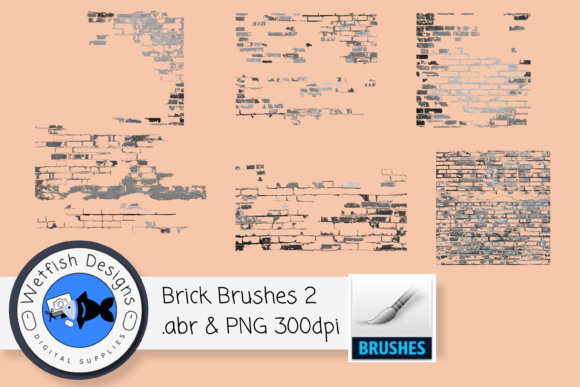
The collection includes six distinct brush presets, each crafted to deliver crisp, clear brick textures. Whether you are working on a mixed-media collage, enhancing a photograph, or building a complex digital background, these brushes provide the structural integrity needed to ground your designs. The value lies not just in the aesthetic appeal, but in the efficiency they bring to your workflow. Instead of searching through endless stock photo libraries for the right angle or lighting, you have immediate, customizable control over the texture directly within your software.
Understanding the File Formats and Compatibility
One of the most practical aspects of this listing is the dual-format delivery. You receive one .abr file, which is the native brush format for Adobe Photoshop, along with six individual PNG files. Each PNG corresponds to one of the brushes and is saved separately with a transparent background at 300dpi. This approach ensures maximum flexibility across different software ecosystems.
If you are a user of Photoshop or Affinity Designer, the .abr file allows for instant integration. You can load the brushes and begin painting with variable opacity and flow, just as you would with any standard tool. However, the utility extends beyond Adobe products. Any software capable of opening .abr files can utilize these presets. For those who prefer other platforms, the high-resolution PNGs serve as standalone stamps or texture overlays. Because they are saved at 300dpi with transparency, they maintain their sharpness even when scaled for print projects or high-definition screens.
It is important to note a specific limitation for tablet users: these brushes will not work natively in Procreate. Procreate uses its own proprietary brush engine and does not support .abr imports in the same way desktop software does. However, this is not a dead end for iPad artists. If you have the skill set to create custom brushes in Procreate, you can use the provided PNG images as source shapes. This requires a bit more technical effort, but it allows you to recreate the functionality of these brushes within the Procreate environment. For users who are not comfortable with this process, sticking to the PNGs as stamped elements or using them in desktop-based workflows is the most efficient path.
Enhancing Realism in Photography and Mixed Media
Photographers often struggle with images that feel too clean or sterile. A portrait taken against a plain wall or a product shot on a white background can lack emotional weight. By applying 6 High Resolution Brick Brushes 2, you can introduce an urban, industrial, or rustic context without needing to reshoot. Imagine a fashion portrait where the subject is subtly blended into a weathered brick backdrop. The texture adds grit and narrative, suggesting a story about the location without distracting from the main subject.
In mixed media and digital scrapbooking, these brushes excel at creating layers of history. Scrapbooking is not just about arranging photos; it is about preserving memory with tactile warmth. Using these brick textures as background elements can mimic the look of aged walls or urban exploration journals. Because the brushes produce crisp lines, they do not become muddy when layered with other elements like paper tears, ink splatters, or handwritten notes. This clarity ensures that your final composition remains legible and visually balanced.
Streamlining Workflow for Designers and Marketers
For entrepreneurs, marketers, and small business owners, time is a critical resource. Creating custom backgrounds for social media posts, website headers, or promotional flyers often involves tedious masking and blending. With these pre-made brushes, you can generate unique backgrounds in seconds. Instead of relying on generic, overused stock patterns, you can paint a custom brick texture that fits your brand’s color palette perfectly. This level of customization helps strengthen brand communication by ensuring that every visual asset feels bespoke and intentional.
Consider a local coffee shop launching a new urban-themed campaign. Using these brushes, a freelance designer can quickly mock up posters that feature exposed brick aesthetics, aligning with the interior design of the shop. The ability to adjust the size and opacity of the brush strokes means the texture can be subtle enough to serve as a watermark or bold enough to act as a primary design element. This versatility simplifies decision-making during the design process, allowing creators to experiment with different looks without starting from scratch.
Technical Considerations and Best Practices
To get the most out of 6 High Resolution Brick Brushes 2, it is helpful to understand how digital brushes interact with layer modes. Simply painting black bricks on a white background may look flat. To achieve a realistic effect, try painting the texture on a separate layer and experimenting with blend modes such as Multiply, Overlay, or Soft Light. This allows the underlying colors and shadows of your artwork to show through the brick pattern, creating a seamless integration.
Additionally, because no instructions are provided on how to load or use these brushes, users must already possess basic proficiency with their chosen software. This product is best suited for individuals who are comfortable navigating brush panels, importing files, and managing layers. If you are a beginner, you may need to consult external tutorials on how to install .abr files in Photoshop or how to import PNGs as brushes in other programs. The value of this tool is realized fully only when the user has the foundational skills to manipulate it.
When comparing options, consider the resolution needs of your project. At 300dpi, these PNGs are suitable for both web and print. However, if you are working on massive billboards or extremely large format prints, you should test the scalability of the PNGs to ensure they meet your specific sharpness requirements. For most standard design tasks, including A4 prints, web banners, and social media graphics, the quality is more than sufficient.
Who Benefits Most from This Tool?
This collection is ideal for a wide range of creatives. Digital painters can use it to add architectural details to concept art. Graphic designers can employ it to create textured typography or frame elements. Educators teaching digital art can use it as a case study for texture mapping and layer blending. Even hobbyists who enjoy digital journaling will find the ease of use appealing. The key benefit is the removal of friction between idea and execution. When the tools are reliable and high-quality, creativity flows more freely.
In conclusion, 6 High Resolution Brick Brushes 2 offers a practical solution for adding depth and character to digital projects. By providing both brush files and high-resolution PNGs, it accommodates various workflows and software preferences. While it requires existing technical knowledge to operate effectively, the payoff is a significant enhancement in the visual quality and efficiency of your design work. Whether you are refining a photograph or building a complex digital composition, these brushes provide the tangible touch needed to make your art resonate.