Mastering Digital Ink with Procreate Tattoo Brushes
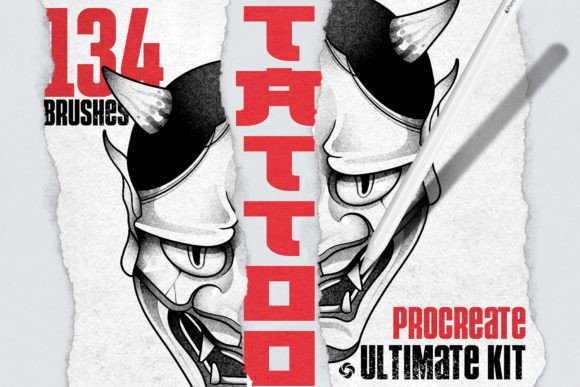
Digital illustration has evolved from a niche hobby into a professional standard for concept art, flash sheet creation, and client consultations. For tattoo artists and digital designers alike, the gap between traditional hand-poked precision and digital fluidity can feel vast. This is where specialized tools become essential. Tattoo Brushes for Procreate are not just another pack of generic strokes; they are engineered to replicate the tactile resistance, ink flow, and texture of real-world tattooing equipment within the iPad ecosystem.
When you open your canvas, the immediate difference lies in the responsiveness. Standard round brushes often feel too uniform, lacking the organic variation that gives hand-drawn art its soul. In contrast, this collection offers a nuanced approach to digital inking. The linework brushes mimic the sharp snap of a traditional liner needle, allowing for crisp, confident strokes that do not waver under pressure. Meanwhile, the shading tools provide the granular control needed to build depth without resorting to muddy gradients. Whether you are drafting a neo-traditional eagle or sketching minimalist geometric patterns, these assets bridge the divide between analog tradition and digital convenience.
The Visual Language of Digital Tattooing
Understanding the visual characteristics of these brushes requires looking beyond simple stroke shapes. The personality of Tattoo Brushes for Procreate is rooted in authenticity. Traditional tattooing relies heavily on the interaction between needle configuration, skin texture, and ink viscosity. Replicating this digitally means accounting for pressure sensitivity, tilt, and speed.
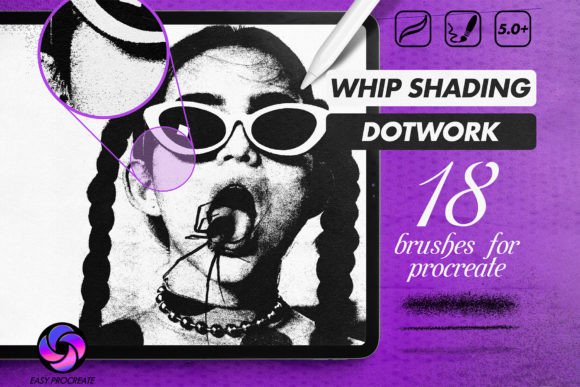
The linework variants in this set are designed to behave like single-needle or magnum shaders depending on your stylus angle. This creates a dynamic line weight that feels intentional rather than algorithmic. For artists who prefer a more textured aesthetic, the inclusion of stippling and marker-style brushes adds a layer of grit and realism. These textures are crucial for creating designs that look lived-in and organic, avoiding the sterile perfection that often plagues vector-based artwork.
This versatility makes the set appealing to a broad spectrum of creatives. It is not limited to tattooists. Graphic designers working on brand identity projects often seek handwritten font alternatives that feel genuine. By using these brushes to create custom lettering or logos, you achieve a unique creative font style that cannot be replicated with standard typefaces. The result is a modern typography look that retains human error and charm, which is increasingly valued in marketing materials that aim to connect emotionally with audiences.
Strategic Applications Across Creative Industries
The utility of high-quality digital brushes extends far beyond the tattoo studio. In the realm of logo design, clients are moving away from rigid, corporate aesthetics toward bespoke, hand-crafted marks. Using these brushes allows designers to draft logo concepts that possess the warmth of a script font but with the structural integrity of a sans serif font. This hybrid approach is particularly effective for lifestyle brands, craft breweries, and boutique retailers who want their brand identity to feel approachable yet professional.
In editorial design and publishing, custom illustrations created with these tools can serve as striking chapter headers or spot illustrations. They add a layer of sophistication that stock imagery often lacks. Similarly, in packaging design, the textured shading capabilities allow for realistic renderings of products before they go to print. You can simulate the look of embossed foil or matte finishes by layering specific brush textures, giving stakeholders a clearer vision of the final product.
For social media managers and content creators, speed and uniqueness are currency. Creating social media graphics with custom brush strokes helps maintain visual consistency across platforms. Instead of relying on overused templates, you can generate unique backgrounds, dividers, and accents that align with your brand’s voice. This level of customization enhances audience engagement, as viewers subconsciously recognize the effort and artistry behind the content.
Optimizing Workflow and Technical Integration
Integrating new tools into an existing workflow should enhance efficiency, not complicate it. One of the strongest advantages of Tattoo Brushes for Procreate is the seamless installation process. After purchase, you receive a direct download link. Opening the file on your iPad via Procreate triggers an automatic installation, making the brushset immediately available. This frictionless setup ensures you can start creating without troubleshooting complex file paths or compatibility issues.
However, mastering the tools requires understanding their technical parameters. Each brush in the collection allows for adjustment of size and pressure sensitivity. For fine linework, reducing the minimum size and increasing pressure sensitivity can help achieve hairline details. Conversely, for bold shading, expanding the size range allows for broader coverage with fewer strokes. Experimenting with these settings is key to finding the sweet spot for your specific drawing style.
When considering font pairing or integrating these brush-created elements with text, readability remains paramount. If you use textured brushes for background elements, ensure they do not compete with foreground text. In web design, heavy textures can increase load times if not optimized correctly, so it is advisable to export these elements as lightweight PNGs with transparent backgrounds. For print projects, always work in CMYK color profiles where possible, or convert carefully, to ensure the deep blacks and rich grays of your shading translate accurately to paper.
Selecting the Right Assets for Your Project
Choosing the right digital assets involves evaluating project fit and licensing requirements. While many free brushes exist online, they often lack the refinement and commercial safety of premium packages. Tattoo Brushes for Procreate are designed as a commercial font equivalent in the brush world—meaning they are built for professional use. Before incorporating them into client work, verify the license terms to ensure they cover commercial applications, especially if you plan to sell the resulting artwork or use it in merchandise.
Testing font pairings and brush styles together is a critical step in the design process. If you are creating a poster that combines bold, brush-drawn headlines with body text, choose a clean serif font or sans serif font for the body to balance the visual weight. The contrast between the organic, irregular lines of the brushwork and the structured geometry of the typeface creates a compelling visual hierarchy. This balance guides the viewer’s eye naturally through the composition, enhancing both aesthetics and communication.
Ultimately, the value of these brushes lies in their ability to empower creativity without imposing limitations. They provide the precision needed for technical accuracy and the freedom required for artistic expression. Whether you are a seasoned tattoo artist refining your flash sheets, a marketer designing eye-catching campaigns, or a hobbyist exploring digital art, these tools offer the control necessary to bring your vision to life. By focusing on quality, versatility, and ease of use, Tattoo Brushes for Procreate stand out as an essential addition to any digital artist’s toolkit.