Mastering Realistic Textures with Animal Fur Brushes in Digital Art
Digital illustration has evolved far beyond flat colors and simple gradients. Today’s audiences expect depth, tactile realism, and intricate detail, particularly when it comes to organic subjects. Whether you are a professional concept artist, a freelance illustrator, or a hobbyist looking to elevate your portfolio, the ability to render convincing fur and hair is a critical skill. This is where specialized tools like Animal Fur Brushes become indispensable assets in your creative workflow. These are not merely decorative stamps; they are engineered instruments designed to replicate the complex physics of light interacting with individual strands of hair.
The integration of high-quality dynamic brushes into your process can significantly reduce the time spent on manual detailing while simultaneously increasing the visual fidelity of your work. By understanding how these tools function within the broader context of digital painting, you can streamline your production pipeline and achieve consistent, professional results across various projects.
Understanding the Versatility of Dynamic Fur Tools
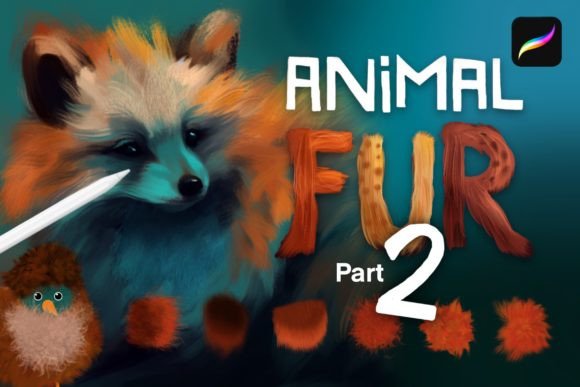
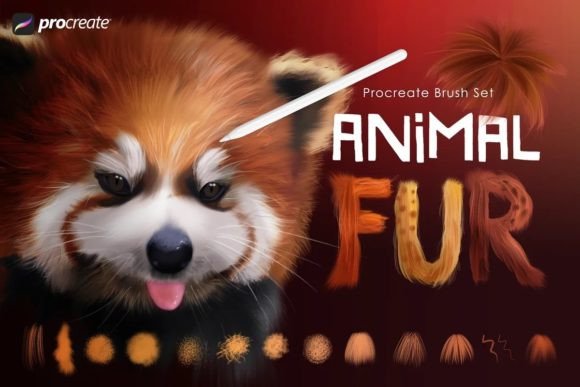
A common misconception among digital artists is that texture brushes are limited to specific niches. However, a comprehensive set of 32 high quality dynamic fur and hair brushes for pet portraits in Procreate offers far more utility than just rendering dogs or cats. The core value lies in the variation. A robust brush set provides a spectrum of textures, ranging from smooth, sleek coats to wiry, coarse terrier fur, and even the delicate, airy softness of kitten down. This diversity allows artists to tackle a wide array of subjects without switching software or hunting for additional plugins.
Beyond traditional animals, these brushes are equally effective for fantasy art. Creating a unicorn with a flowing mane or a monster with matted, rugged hide requires the same fundamental understanding of strand direction and layering. Furthermore, the underlying mechanics of these brushes make them surprisingly effective for human hair. The algorithms that simulate clumping and flow in animal fur translate seamlessly to rendering realistic locks, beards, and eyebrows. This cross-application potential means that investing in a specialized set yields returns across multiple genres of illustration.
Integrating Brushes into Your Creative Workflow
To maximize efficiency, it is essential to view these brushes as part of a structured process rather than a final touch-up trick. Successful implementation involves three distinct phases: preparation, execution, and refinement.
Phase 1: Preparation and Base Layers
Before applying any fur texture, you must establish a solid foundation. The included base brushes in this set are designed specifically for this purpose. Start by blocking in the general shape and volume of your subject using solid colors. Do not worry about individual strands at this stage. Instead, focus on the major shadow and light patterns. Using the base brushes, you can quickly add initial shading and define the form. This step is crucial because fur brushes rely on the underlying values to create depth. If the base is flat, the fur will look pasted on rather than growing from the skin.
During this phase, consider the direction of growth. Map out the flow of the fur with loose strokes. This planning stage ensures that when you begin using the dynamic fur brushes, every stroke contributes to the overall anatomy and movement of the creature. Proper organization of your layers at this stage—separating the base color, shadows, and highlights—will give you greater control later in the process.
Phase 2: Building Texture and Depth
Once the base is established, you can begin the core task of rendering fur. This is where the variety of the Animal Fur Brushes shines. Select a brush that matches the coarseness of the area you are working on. For example, use a smoother brush for the face and ears, and a coarser, wiry brush for the body or tail. The key technique here is layering. Do not attempt to create full density in a single pass. Instead, build up the fur layer by layer, starting with longer, sparser strokes and gradually adding shorter, denser details.
An advanced technique for achieving realistic results is using these brushes to smudge as well as paint. Many digital artists keep their painting and blending tools separate, but using a fur-textured brush to gently blend edges can maintain the integrity of the hair strands while softening harsh transitions. This method preserves the chaotic, organic nature of real fur, which rarely has perfectly sharp edges everywhere. By alternating between painting new strands and smudging existing ones, you create a natural interplay between defined details and soft volume.
Phase 3: Refinement and Special Details
The final phase focuses on high-impact details that bring the portrait to life. This includes painting the eyes, nose, and whiskers. The set includes specialized brushes for these fine details, ensuring that the focal points of your artwork are crisp and engaging. When rendering eyes, use the finest brushes to add reflections and subtle fur around the eyelids. For noses, texture is key; use a stippling or coarse brush to mimic the porous surface of a dog or cat nose.
To enhance the richness of your colors, experiment with layer blend modes. Setting a layer to Overlay or Multiply can deepen shadows and intensify highlights without manually repainting. This is particularly effective for adding warmth to golden fur or cooling down shadow areas in blue-toned coats. By combining these blend modes with the dynamic brushes, you achieve a level of color complexity that mimics the way light penetrates and scatters through translucent hair shafts.
Practical Tips for Consistent Quality
- Pressure Sensitivity: Ensure your tablet settings are calibrated correctly. The dynamic nature of these brushes relies on pressure input to vary the thickness and opacity of strokes. Light touches should produce fine, wispy hairs, while heavier pressure creates bold, defining strands.
- Color Variation: Avoid using a single flat color for fur. Real fur contains multiple hues. Sample colors from your reference image frequently, and introduce subtle variations in hue and saturation to prevent the artwork from looking plastic or artificial.
- Reference Usage: Always work with high-resolution references. Pay attention to how fur behaves in different lighting conditions. Notice how backlighting creates a halo effect and how overhead lighting casts deep shadows between clumps of hair.
- Layer Management: Keep your workflow organized by using separate layers for different texture types. For instance, keep the undercoat on one layer and the guard hairs on another. This allows you to adjust the opacity or blend mode of each texture independently.
Expanding Beyond Pet Portraits
While the primary marketing of these tools often targets pet portrait artists, their utility extends to character design, fashion illustration, and environmental art. Fashion designers can use the softer brushes to render faux fur coats or wool textures. Character artists can utilize the wiry brushes for creating rugged barbarian attire or mythical creature skins. Even landscape painters can adapt these tools for rendering grass, moss, or distant foliage, where the principle of clustered, directional strokes remains the same.
For educators and content creators, demonstrating the use of these brushes can serve as an excellent tutorial topic. Showing the transition from a flat base to a fully rendered furry subject provides clear, actionable value to students and followers. It demystifies the process of texture creation and encourages learners to experiment with layering and blending techniques.
Long-Term Value and Efficiency
Investing in a high-quality brush set is a decision that pays dividends over time. Initially, there may be a learning curve as you familiarize yourself with the specific behavior of each of the 32 brushes. However, once integrated into your muscle memory, these tools drastically reduce the time required for rendering. What might have taken hours of manual line work can be achieved in minutes with strategic brush application. This efficiency allows you to take on more projects, meet tighter deadlines, or simply spend more time on the creative aspects of composition and storytelling.
Moreover, consistency is vital for building a recognizable style. By relying on a trusted set of Animal Fur Brushes, you ensure that your textural quality remains high across all your works. Clients and audiences come to expect a certain level of craftsmanship, and having reliable tools helps you deliver that consistently. Whether you are creating a quick sketch or a polished commission, these brushes provide the flexibility and power needed to execute your vision effectively.
In conclusion, mastering the art of digital fur rendering is less about innate talent and more about utilizing the right tools with a structured approach. By incorporating these dynamic brushes into your workflow, focusing on layering, and experimenting with blend modes, you can transform flat illustrations into vibrant, tactile realities. The versatility of these tools ensures they remain relevant regardless of your specific artistic niche, making them a worthy addition to any digital artist’s toolkit.