Procreate Watercolor Painting Brushes: Bringing Fluid Art to Your iPad
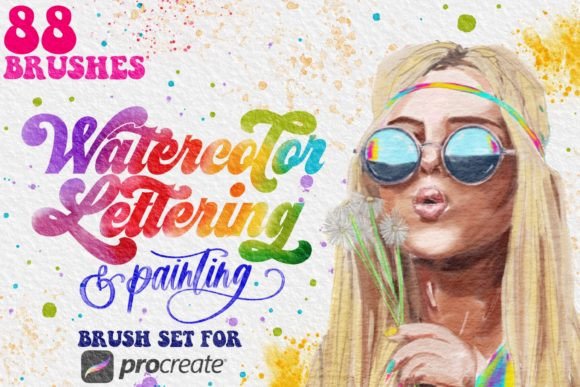
There is a distinct, almost meditative joy in watching watercolor pigment bloom across textured paper. For years, that experience was confined to physical studios, requiring specific lighting, expensive supplies, and the inevitable cleanup of stained brushes and palettes. However, the digital art landscape has evolved dramatically, bridging the gap between traditional media and modern convenience. With tools like Procreate Watercolor Painting Brushes, artists can now replicate the organic unpredictability of wet-on-wet techniques without ever getting their hands dirty. This isn’t just about mimicking a look; it is about capturing the soul of watercolor—the transparency, the granulation, and the soft edges—within the versatile ecosystem of Procreate on the iPad.
The Freedom of Digital Fluidity
One of the most compelling reasons to integrate these brushes into your workflow is the sheer freedom they offer. In traditional watercolor, mistakes are often permanent. A drop of too much water or an errant brushstroke can ruin hours of work. With this brush set, you gain the safety net of digital undo buttons while maintaining the aesthetic integrity of hand-painted art. This makes it an invaluable resource for illustrators who need to meet tight deadlines but still want their work to feel warm, human, and organic.
Consider the freelance illustrator working from a coffee shop or while traveling. Carrying a full watercolor kit, jars of water, and heavy paper pads is impractical. An iPad Pro paired with an Apple Pencil and this specific brush set transforms any location into a studio. You can sketch, paint, and finalize a piece on a train, in a park, or during a lunch break. The portability factor alone changes how and when you create, allowing inspiration to strike without logistical barriers.
Real-World Applications Across Industries
While fine artists love these tools for personal expression, their utility extends far beyond hobbyist painting. Various industries are increasingly seeking the "hand-made" look to stand out in a sea of sterile, vector-based graphics.
- Wedding and Event Stationery: Designers creating wedding invitations, save-the-dates, and menu cards often rely on soft, romantic aesthetics. Using these brushes allows for custom floral elements and background washes that feel bespoke and elegant, rather than clip-art generic.
- Children’s Book Illustration: The gentle, forgiving nature of watercolor is perfect for storytelling. Authors and illustrators can create cohesive character designs and backgrounds that evoke nostalgia and warmth, appealing directly to young readers and parents alike.
- Fashion and Textile Design: Before committing to fabric printing, designers can experiment with pattern repeats and color combinations digitally. The ability to tweak hues instantly using Procreate’s adjustment layers means you can test fifty variations of a floral print in the time it would take to mix one physical pigment.
- Interior Decor and Wall Art: Artists selling prints on platforms like Etsy or Society6 find that watercolor styles remain perennial bestsellers. The texture adds depth to digital prints, making them appear more valuable and tactile to consumers browsing online.
Understanding the Toolkit
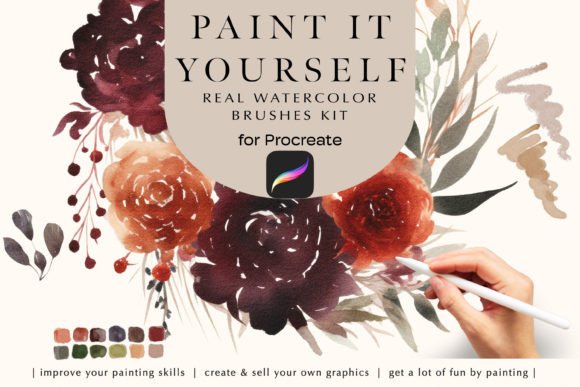
To truly leverage the potential of Procreate Watercolor Painting Brushes, it helps to understand what is included and how each component contributes to the final image. This particular set is designed with precision, offering five distinct brushes that cover the essential stages of a watercolor painting process. These aren't just static stamps; they react to pressure and tilt, simulating the way real bristles hold and release pigment.
The inclusion of a high-resolution Watercolor Paper texture (4000×3000px at 300 DPI) is crucial. Digital watercolor can look flat if painted on a pure white, smooth canvas. By painting over a realistic paper grain, the pigments appear to settle into the fibers, creating authentic granulation effects. This subtle detail is often what separates amateur digital attempts from professional-looking artwork.
Additionally, the set comes with a curated .PROCREATE color palette and .SWATCHES file. Choosing colors in watercolor is tricky because wet pigment looks different than dry pigment. These pre-selected swatches are tuned to mimic traditional tube colors, saving you the trial and error of mixing digital hues that might look muddy or unnatural. It provides a solid starting point, especially for those new to the medium.
Who Benefits Most from This Approach?
This toolset serves a diverse range of users, each finding unique value in its features.
The Traditional Artist Transitioning to Digital: If you have spent years mastering physical watercolors, moving to a screen can feel alien. These brushes are engineered to minimize that learning curve. They respond to the Apple Pencil in a way that feels familiar, allowing you to transfer your existing muscle memory and technique to the iPad with minimal friction.
The Graphic Designer Seeking Texture: Designers often struggle to add organic warmth to clean layouts. Instead of searching for stock textures to overlay, you can paint custom accents directly into your design. This ensures originality and seamless integration with your typography and layout elements.
The Beginner Hobbyist: For someone intimidated by the cost and complexity of traditional supplies, this is a low-risk entry point. There is no waste of paper or paint. You can experiment freely, learn how colors blend, and understand layering without the fear of ruining expensive materials.
Technical Considerations and Setup
Before diving in, it is important to ensure your hardware and software are ready to handle these assets. These brushes are optimized specifically for the Procreate app and require iOS to be updated to support the latest features. They are compatible with Procreate 5 and higher, ensuring access to advanced blending modes and brush engine capabilities.
It is worth noting that these brushes do not work in other applications like Adobe Fresco or Photoshop on iPad. They are crafted exclusively for Procreate’s engine. Therefore, having an iPad Pro and an Apple Pencil is highly recommended to get the full benefit of pressure sensitivity and tilt recognition. While they may function on older iPad models, the performance and responsiveness are best experienced on newer hardware.
Installation is straightforward but requires attention to detail. You will receive a .BRUSHSET file which imports all five brushes at once, along with the paper texture and color files. Ensuring your iOS is up to date prevents compatibility glitches that can sometimes occur with complex brush engines. Once installed, take a moment to explore the settings of each brush. Adjusting the size, opacity, and flow can help you tailor the tool to your specific hand pressure and artistic style.
Embracing the Digital Watercolor Workflow
Using Procreate Watercolor Painting Brushes is not just about replicating tradition; it is about expanding creative possibilities. You can combine these organic textures with digital precision, using masks to keep edges sharp where needed while letting colors bleed softly in others. You can duplicate layers to intensify color without waiting for paint to dry. You can export your work in various formats suitable for both web display and high-quality print.
The magic lies in the balance. It offers the ease of digital editing with the emotional resonance of hand-painted art. Whether you are illustrating a children's book, designing a wedding invitation, or simply relaxing after a long day, these tools provide a bridge between technology and tradition. They allow you to craft masterpieces with precision, transforming your digital canvas into a space where water and pigment dance freely, unrestricted by the physical limits of the real world.