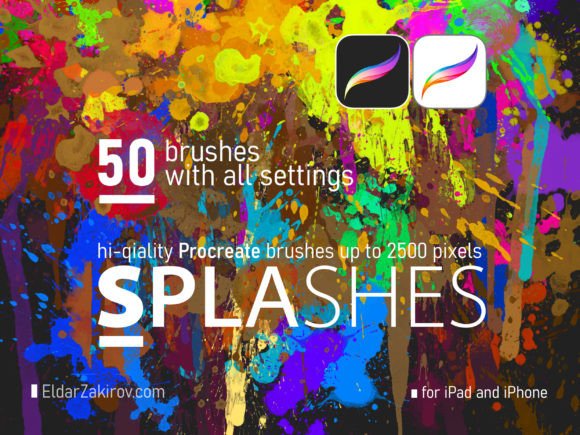
50 Hi-Res SPLASHES Brushes for PROCREATE
Digital art often suffers from a sterile, overly polished aesthetic. While precision is valuable, the human eye craves texture, imperfection, and organic movement. This is where the 50 Hi-Res SPLASHES Brushes for PROCREATE transform your workflow. Designed for both professional designers and passionate hobbyists, this collection bridges the gap between digital control and analog chaos. Whether you are illustrating a gritty comic book, designing a textured logo, or adding atmospheric depth to a portrait, these tools provide the authentic physicality that standard digital brushes often lack.
The core value of this set lies in its resolution and versatility. With brush stamps reaching up to 2500 pixels, every splatter, blot, and fingerprint retains crisp detail even when scaled for large-format prints or high-resolution displays. This level of fidelity ensures that your artwork remains professional-grade, regardless of the final output medium.
Beyond Basic Splatters: Understanding the Toolkit
Many artists assume splash brushes are limited to simple paint drips. However, this collection offers a nuanced library of fifty distinct tools categorized into splashes, spatters, blots, smudges, fingerprints, and drip-drops. Each category serves a specific artistic function, allowing for layered and complex compositions.
- Splashes and Spatters: Ideal for creating dynamic energy. Use these to simulate action lines in comics, background noise in posters, or realistic water effects in landscapes.
- Blots and Smudges: These provide softer, more diffused textures. They are perfect for creating shadows, weathering effects on objects, or blending colors without losing the hand-painted feel.
- Fingerprints: A unique addition that adds an immediate human touch. These are excellent for mystery-themed illustrations, personal branding elements, or adding a tactile, "handled" quality to digital designs.
- Drip-Drops: Essential for gravity-based realism. Use these to enhance liquid simulations, create melting effects, or add vertical movement to static compositions.
The intelligence behind these brushes is evident in how they respond to input. By varying pencil pressure and tilt, each stamp differs from the previous one in size, direction, rotation, and shade. This stochastic behavior prevents the repetitive, robotic look that plagues lower-quality brush sets. It encourages experimentation, as no two strokes are exactly alike, mirroring the unpredictability of real-world media.
Creative Applications Across Industries
The utility of the 50 Hi-Res SPLASHES Brushes for PROCREATE extends far beyond fine art. Different professionals can leverage these tools to solve specific visual problems and elevate their projects.
Graphic Design and Branding
In marketing and branding, standing out is crucial. Clean vector graphics are standard, but adding organic texture can make a brand feel more approachable and authentic. Designers can use the blot and smudge brushes to create distressed backgrounds for event posters or social media campaigns. The fingerprint brushes, in particular, offer a clever way to personalize logos or packaging designs, suggesting craftsmanship and attention to detail.
Digital Illustration and Concept Art
For illustrators, speed and texture are key. When sketching concepts, using splash brushes can help block in lighting and atmosphere quickly. Instead of manually painting every leaf or stone, artists can use spatter brushes to suggest foliage or rough terrain, then refine only the focal points. This technique saves time while maintaining a loose, energetic style that clients often find appealing in early-stage concepts.
Education and Content Creation
Educators and bloggers creating digital materials can use these brushes to make worksheets, presentations, and thumbnails more engaging. A math worksheet with subtle ink splatters feels less intimidating than a stark white page. Similarly, YouTubers and influencers can use the drip and splash elements to create eye-catching thumbnail overlays that convey excitement or urgency without relying on cliché stock effects.
Mastering the Technique: Pressure, Tilt, and Layering
To get the most out of this set, users must understand how to manipulate the digital canvas. The brushes are designed to react to the Apple Pencil’s capabilities. A light touch yields a faint, small speck, while firm pressure creates a bold, saturated splash. Tilting the pencil changes the angle of the stamp, allowing for directional flow that mimics natural movement.
Pro Tip: Do not rely on a single layer. Build your textures by stacking multiple low-opacity splashes. This creates depth and complexity, making the effect look like it was built up over time rather than stamped on instantly. Use clipping masks to contain splatters within specific shapes, ensuring your design remains clean and organized despite the chaotic nature of the brushes.
Seamless Integration into Your Workflow
One of the biggest barriers to adopting new tools is the installation process. Fortunately, integrating the 50 Hi-Res SPLASHES Brushes for PROCREATE is straightforward and user-friendly, whether you are using an iPad or iPhone. The set is compatible with both Procreate and Procreate Pocket, ensuring accessibility across devices.
For those transitioning from desktop software, it is worth noting that a Photoshop version is also available, which works seamlessly with Photoshop Elements and Adobe Fresco. This cross-platform compatibility allows teams to maintain consistent visual styles regardless of their preferred hardware.
How to Install the Brushes
Getting started takes only moments. Follow these steps to import the set into your library:
- Download the
SPLASHES_50_Hi-Res_Brushes.brushsetfile to your device. - Open the Files application on your iPad and locate the downloaded file.
- Tap the file. It will automatically launch Procreate and import the set.
- Look at the top of your Brush Library list. The new folder, titled “SPLASHES 50 Hi-Res Brushes,” will appear there.
Alternatively, you can import manually within the app:
- Open Procreate and tap the Brush Library icon.
- Tap the plus sign (+) at the top right of the Brush Library title.
- Select “Import” from the Brush Studio window.
- Navigate to and select the
SPLASHES_50_Hi-Res_Brushes.brushsetfile.
Once installed, the brushes are ready to use immediately. No complex configuration is required, allowing you to dive straight into creation.
Maintaining Quality and Consistency
While chaos is the goal, disorder is not. To keep your results effective and audience-friendly, consider the context of your project. In professional design, less is often more. Use the high-resolution splashes as accent elements rather than overwhelming the entire composition. Ensure that the color palette of your splatters complements the overall design scheme. Because these brushes support up to 2500 px resolution, you can afford to be subtle; a small, well-placed speck can draw the eye just as effectively as a large, bold splash.
Furthermore, organize your layers logically. Keep texture layers separate from line art and base colors. This non-destructive workflow allows you to adjust opacity, blend modes, and positioning without altering the underlying artwork. It gives you the freedom to experiment boldly while retaining the ability to refine and polish the final piece.
The 50 Hi-Res SPLASHES Brushes for PROCREATE are more than just a set of tools; they are an invitation to embrace imperfection. By integrating these organic elements into your digital workflow, you add soul, depth, and realism to your creations. Whether you are a seasoned designer looking to break free from rigid vectors or a beginner eager to explore textural possibilities, this collection provides the high-quality resources needed to elevate your art. Start experimenting today, and let the splashes guide your creativity.