Master Procreate Liner Marker Brushes
Digital illustration often struggles to capture the tactile satisfaction of traditional media. The scratch of a pen on paper, the bleed of alcohol ink, and the subtle grain of marker texture are elements that define the soul of hand-drawn art. This is where Procreate Liner Marker Brushes bridge the gap between analog warmth and digital precision. By integrating tools that mimic Copic markers, Micron liners, and textured sketchers, artists can achieve a level of realism that feels both nostalgic and modern.
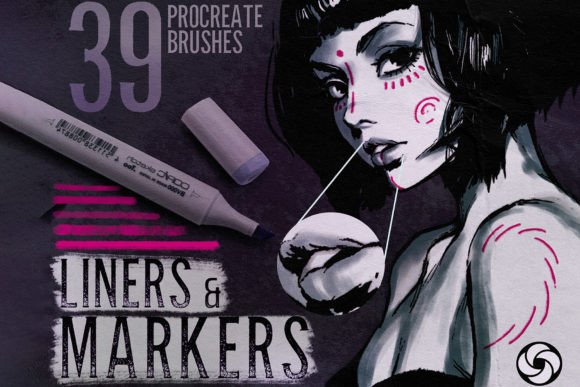
For creators ranging from freelance designers to hobbyist illustrators, having a versatile toolkit is essential. A set of 39 high-quality brushes offers more than just variety; it provides a comprehensive ecosystem for visual storytelling. Whether you are designing character concepts, creating social media graphics, or drafting architectural sketches, these tools adapt to your workflow rather than forcing you to adapt to them.
The Power of Realistic Textures in Digital Art
The primary advantage of using specialized Procreate Copic Markers Brushes lies in their ability to replicate organic imperfections. Standard digital brushes often feel too clean, resulting in artwork that looks sterile or computer-generated. In contrast, brushes with unique textures introduce noise, grain, and edge variation that mimic real-world materials.
Consider the difference between a flat color fill and a stroke from a wet marker brush. The latter carries the weight of the pigment, showing how ink pools at the edges of a shape or fades as the "ink" runs dry. This behavior allows for blending and layering techniques that are intuitive for anyone familiar with traditional media. When you combine these with Micron Liners for Sketching and Drawing, you gain the ability to create crisp, confident outlines that anchor your colorful compositions.
This realism is not just about aesthetics; it is about communication. Viewers connect emotionally with art that feels handmade. The slight irregularity of a rough marker or the stippled effect of a dry brush adds character and depth, making your work stand out in a saturated digital landscape.
Exploring the Brush Set Versatility
A collection of 39 brushes is significant because it covers the entire spectrum of the illustration process. Instead of switching between multiple apps or purchasing separate packs, you have a unified system. Here is how different categories within the set serve distinct creative needs:
- Copic Brushes for Procreate: Ideal for smooth gradients and vibrant coloring. These simulate the alcohol-based blendability of real Copic markers, allowing for seamless transitions between hues.
- Amazing Micron Liners: Perfect for technical drawings, comic inking, and detailed doodles. They offer consistent line weight and opacity, crucial for professional-looking final pieces.
- Wet and Dry Markers: Wet markers provide rich, saturated coverage, while dry brushes introduce texture and break-up, excellent for adding age or weathering effects to objects.
- Textured Sketchers and Grainy Brushes: These are invaluable for the initial ideation phase. They allow for loose, expressive gestures that capture movement and energy without getting bogged down in details.
- Stipple and Vintage Brushes: Use these for shading and atmospheric effects. Stippling creates tone through dots, offering a classic printmaking look, while vintage brushes add a nostalgic, faded quality to your palette.
This variety ensures that the set works for everyone. A graphic designer might rely heavily on the flat brushes and liners for clean vector-style illustrations, while a concept artist might lean into the rough markers and grainy textures for mood pieces. The flexibility allows you to paint in any style, from hyper-realistic portraits to abstract expressionism.
Practical Applications for Creators and Entrepreneurs
Beyond fine art, these tools have substantial commercial value. Small business owners and marketers can use Procreate Liner Marker Brushes to create unique branding assets that feel personal and approachable. Hand-lettered logos, custom icons, and social media templates benefit greatly from the human touch these brushes provide.
Educators and publishers can utilize the micron liners and sketchers to create engaging worksheets, storyboards, or educational diagrams. The clarity of the liners ensures readability, while the marker textures keep the visuals engaging for students or readers. For freelancers, speed is currency. Having a pre-configured set of brushes that behave predictably reduces setup time, allowing you to focus on delivering value to clients.
Consider the workflow of a fashion illustrator. They might start with a Textured Sketcher to draft the silhouette, switch to Copic Brushes to render fabric folds and shadows, and finish with Micron Liners to define seams and accessories. This seamless transition within a single app streamlines the creative process significantly.
Installation and Getting Started
One of the most user-friendly aspects of this brush set is its simplicity. There are no complex configurations or external software requirements. The brushes are designed exclusively for Procreate on the iPad, ensuring optimized performance and pressure sensitivity.
- After purchase, you will receive a download link for the file.
- Open the downloaded file directly on your iPad.
- Select "Open in Procreate." The brush set will automatically install and appear in your brush library.
If you encounter any issues during installation, support is readily available. The developer encourages users to reach out with questions, ensuring that technical hurdles do not impede your creative flow. This level of customer care reflects the quality and professionalism embedded in the product itself.
Tips for Maximizing Your Creative Output
To get the most out of these tools, experiment with layer blending modes. Combining a Wet Marker on a multiply layer with a Dry Brush on a normal layer can create complex lighting effects. Do not be afraid to mix styles; use a Vintage Brush for background textures and crisp Micron Liners for foreground elements to create depth.
Consistency is key when building a portfolio. Choose a subset of 5–10 brushes from the 39 available and master them. This helps develop a recognizable signature style. As you become comfortable, gradually introduce new brushes like Stipple Brushes or Rough Markers to expand your visual vocabulary.
Remember, the tool is only as good as the hand that wields it. These Procreate Liner Marker Brushes provide the foundation, but your creativity builds the structure. Whether you are sketching a quick idea or rendering a finished masterpiece, these tools empower you to express your vision with clarity, texture, and confidence.
Embrace the tactile feel of digital art. Let the grain of the paper and the flow of the ink guide your hand. With this comprehensive set, you are not just drawing; you are crafting experiences that resonate with your audience. Start exploring today and discover how realistic textures can transform your digital workflow.