Mastering Digital Portraiture with 46 Specialized Procreate Brushes
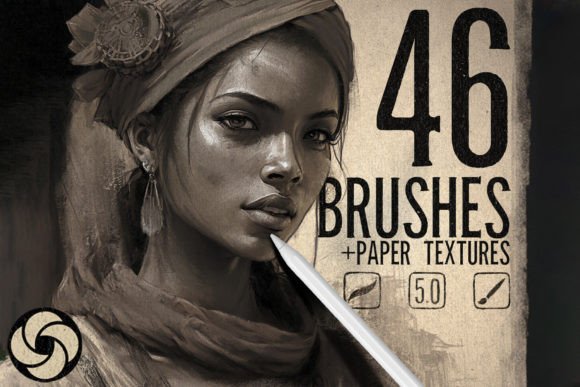
Digital portraiture demands a delicate balance between technical precision and artistic intuition. For artists working on the iPad, the right tools can significantly bridge the gap between a flat digital sketch and a lifelike painting. The 46 Portrait Brushes for Procreate represent a curated collection designed specifically to address the nuanced requirements of face and figure illustration. Rather than offering a generic assortment of drawing tools, this set focuses on the specific textures, blending capabilities, and edge controls necessary for high-quality character art.
Creating realistic skin tones, capturing the subtle flow of hair, and rendering expressive eyes require more than just a standard round brush. This toolkit provides forty-six distinct instruments that mimic traditional media while leveraging the advantages of digital workflow. From soft, airbrushed gradients to hard, graphite-like lines, the variety allows artists to construct dynamic and detailed portraits that maintain an organic feel. The inclusion of paper textures further enhances this realism, providing a tactile foundation that prevents the artwork from appearing overly sterile or computer-generated.
The Composition of the Brush Set
The strength of any digital brush pack lies in its versatility and specialization. This collection is organized to cover every stage of the portrait creation process, ensuring that artists do not need to switch between multiple apps or external plugins to achieve their desired effect. The brushes are categorized by function, allowing for a logical workflow from initial sketch to final detailing.
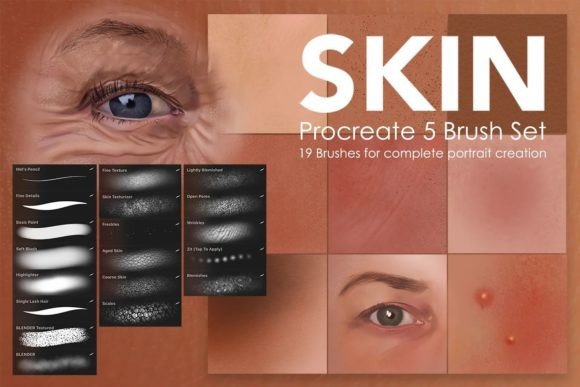
- Sketching Tools: Hard pencil and charcoal variants provide the resistance and texture needed for accurate anatomical studies and initial composition.
- Blending and Smoothing: Soft brushes designed for skin tones allow for seamless transitions between light and shadow, crucial for achieving volumetric depth.
- Hair Rendering: Specialized strokes mimic the flow and clumping of hair strands, reducing the time spent on manual detailing.
- Textural Overlays: Included paper textures add grain and noise, helping to unify the piece and emulate traditional canvas or watercolor paper.
Each brush has been calibrated to respond naturally to Apple Pencil pressure and tilt. This sensitivity is vital for portrait artists who rely on varying line weight to convey form. A heavy hand might produce a bold, opaque stroke for defining jawlines, while a lighter touch yields a translucent wash for cheek blushes. The consistency across the forty-six brushes ensures that the learning curve is minimized; once an artist understands the behavior of one tool, the others feel familiar and intuitive.
Practical Application in Professional Workflows
For freelancers and professional illustrators, time efficiency is as important as aesthetic quality. The 46 Portrait Brushes for Procreate streamline the painting process by eliminating the need to constantly adjust brush settings. Instead of tweaking opacity, flow, and jitter for every new layer, artists can select a pre-configured brush that suits the immediate task. This reliability allows for a more fluid creative state, where focus remains on the subject rather than the software.
Consider the challenge of rendering eyes, often cited as the most difficult feature to get right. These brushes offer specific tools for the iris, sclera, and eyelashes, each with distinct characteristics. The iris brush might have a slight scatter to mimic pigment variation, while the eyelash brush provides a tapered end for natural-looking hairs. By using tools designed for these specific elements, artists can achieve a level of detail that would otherwise require hours of manual refinement.
Moreover, the inclusion of paper textures addresses a common critique of digital art: its perceived lack of soul. By applying a subtle texture overlay, the final image gains a sense of physical presence. This is particularly valuable for artists who print their work or present it in portfolios alongside traditional media. The texture helps the digital piece hold its own in mixed-media exhibitions, blurring the line between the two disciplines.
Usability and Installation Process
Accessibility is a key factor when adopting new digital assets. The installation process for this brush set is designed to be straightforward, minimizing technical friction. After purchase, users receive a download link for the file. The process requires opening the downloaded file directly on the iPad via the Procreate app. Upon selection, the brush set automatically installs and becomes available in the brush library. This seamless integration ensures that artists can begin experimenting with the tools immediately, without navigating complex file directories or importing individual brushes one by one.
It is important to note that these brushes are exclusively compatible with Procreate. They will not function in other digital painting applications such as Photoshop, Clip Studio Paint, or ArtRage. This limitation is due to the proprietary brush engine used by Procreate, which allows for highly optimized performance on iPad hardware. While this restricts the audience to iPad users, it also ensures that the brushes perform optimally within that ecosystem, taking full advantage of the device’s processing power and touch interface.
Should any issues arise during installation, the creator offers support to troubleshoot problems. This level of customer service adds value to the product, providing peace of mind for users who may be less technologically inclined. Clear communication channels ensure that technical hurdles do not prevent artists from utilizing the tools they have purchased.
Who Benefits Most from This Toolkit?
The 46 Portrait Brushes for Procreate are suitable for a wide range of users, but they offer particular value to specific groups. Intermediate to advanced digital painters will find the specialized tools most beneficial, as they already possess the foundational skills to leverage the brushes’ capabilities. Beginners may also benefit, as the pre-set configurations can guide them toward better techniques, such as proper blending and texturing, though a basic understanding of digital painting principles is recommended.
Freelance illustrators who specialize in character design, book covers, or editorial illustrations will appreciate the speed and consistency these brushes provide. The ability to quickly iterate on facial features and expressions allows for faster client revisions and tighter deadlines. Similarly, hobbyists looking to elevate their personal projects will find that the added realism and texture options help their work stand out on social media platforms and online portfolios.
Educators and workshop leaders may also find this set useful for teaching digital portraiture. The clear distinction between brush types makes it easier to demonstrate specific techniques, such as how to build up skin tones or render hair volume. By using a standardized set of tools, instructors can provide more targeted feedback and resources to their students.
Evaluating Long-Term Value and Limitations
When assessing the long-term value of digital assets, longevity and adaptability are key. Unlike physical supplies that deplete over time, digital brushes remain available indefinitely. The 46 Portrait Brushes for Procreate offer a permanent addition to an artist’s toolkit, capable of being used across countless projects. Their versatility ensures they remain relevant even as artistic styles evolve, as the fundamental principles of light, shadow, and texture remain constant.
However, it is essential to recognize that tools alone do not create mastery. These brushes are enhancers, not replacements for skill. Artists must still understand anatomy, color theory, and composition to create compelling portraits. The brushes facilitate the execution of these concepts but do not substitute for the underlying knowledge. Additionally, while the set is comprehensive, some artists may still prefer to customize their own brushes for highly specific effects. In such cases, this set serves as an excellent starting point or supplement rather than a complete solution.
In conclusion, the 46 Portrait Brushes for Procreate provide a robust, professional-grade resource for digital artists seeking to enhance their portraiture work. With a focus on realism, usability, and workflow efficiency, this collection addresses the specific challenges of digital face painting. By combining specialized tools with practical textures, it enables creators to produce lifelike, engaging art that resonates with viewers. For those committed to the Procreate platform, this brush set represents a worthwhile investment in their creative infrastructure.