Mastering Digital Textiles with Sewing Embroidery PS Brushes
In the evolving landscape of digital design, the line between physical craftsmanship and virtual creation continues to blur. Designers, illustrators, and content creators are increasingly seeking tools that offer more than just flat colors and standard shapes. They crave texture, depth, and the tactile warmth of handmade elements. This is where specialized tools like Sewing Embroidery PS Brushes become indispensable assets in a modern creative workflow. These are not merely decorative stamps; they are dynamic instruments designed to replicate the intricate behavior of thread, yarn, and fabric within Adobe Photoshop.
The demand for authentic, organic aesthetics has grown significantly as audiences become more visually literate. In an era saturated with sleek, vector-based minimalism, there is a renewed appreciation for the imperfect, cozy, and detailed look of hand-stitched art. Whether you are designing packaging for an artisanal brand, creating social media graphics for a lifestyle blog, or developing concept art for a game, the ability to simulate real-world textiles digitally can elevate your work from good to exceptional.
The Evolution of Digital Stitching Tools
For years, digital embroidery was a cumbersome process. Designers often relied on static images of stitches, which looked repetitive and lacked the fluidity of real thread. Alternatively, they would manually draw each stitch, a time-consuming method that offered precision but killed creativity and speed. The technology behind brush engines has since advanced, allowing for "dynamic" brushes that react to the user’s input. However, many existing solutions still function like simple stamps or paint tips, failing to capture the continuous, looping nature of actual sewing.
This specific kit represents a significant leap forward because it addresses the fundamental mechanics of stitching. Unlike most Photoshop brushes, which act as static imprints, these Sewing Embroidery PS Brushes follow the line of your stroke. This means that as you drag your cursor across the canvas, the brush calculates the path and lays down the thread realistically, curving around corners and maintaining tension. This functionality allows users to truly "embroider" on screen, providing a level of control and realism that was previously difficult to achieve without extensive manual editing.
A Comprehensive Toolkit for Textural Depth
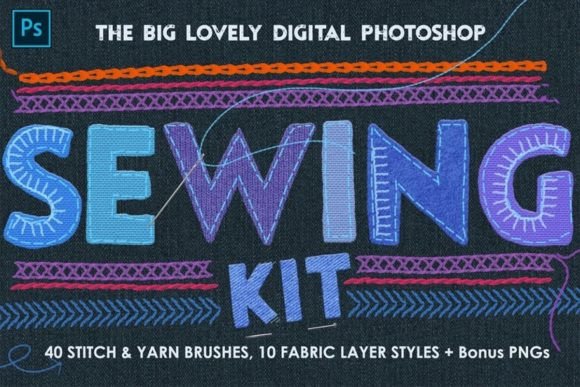
Versatility is key in professional design environments. A single type of stitch rarely suffices for complex projects. This collection has been curated over a long development period to ensure diversity and quality. It includes 40 distinct brushes covering a wide spectrum of textile techniques. You will find traditional running stitches and backstitches, but also more complex textures such as yarns, knits, crochet patterns, braids, and macrame knots. This variety ensures that whether you are simulating a chunky winter sweater or delicate lace trim, you have the right tool for the job.
Beyond the brushes themselves, the kit acknowledges that embroidery does not exist in a vacuum. It interacts with the surface it is stitched onto. To address this, the package includes 9 Photoshop layer styles. These styles allow you to overlay realistic material effects onto your background layers. You can simulate the rough weave of linen, the smooth sheen of silk, the ruggedness of denim, the softness of velvet, or the stiffness of card and leather. By combining these background textures with the embroidery brushes, you create a cohesive visual narrative where the thread appears to physically interact with the fabric beneath it.
Furthermore, the kit includes a specialized layer style designed specifically for the embroidery itself. This effect adds a raised, three-dimensional look to your stitches, mimicking the way light catches on raised threads. This subtle addition of depth is crucial for achieving photorealism and preventing the design from looking flat or digitally artificial.
Integrating into Modern Creative Workflows
For professionals and entrepreneurs, efficiency is as important as quality. The inclusion of additional assets in this download streamlines the entire design process. Alongside the brushes and layer styles, you receive a Photoshop seamless pattern set and grayscale transparent PNGs of buttons, needles, and pins. These elements allow for rapid composition of complex scenes. For instance, a marketer creating a promotional image for a craft subscription box can quickly assemble a realistic flat-lay composition without needing to source individual stock photos or photograph physical items.
The compatibility of these tools is another practical advantage. Tested in Photoshop CS4 and above, including the latest Creative Cloud versions, these brushes integrate seamlessly into established workflows. This backward compatibility ensures that freelancers working with clients who may have older software versions can still collaborate effectively. It also means that educators teaching digital art can rely on these tools being accessible to students regardless of their specific software update cycle.
Practical Applications Across Industries
The utility of Sewing Embroidery PS Brushes extends far beyond hobbyist projects. Here is how different professionals can leverage this toolkit:
- Brand Identity and Packaging: Artisanal brands, particularly in food, fashion, and home goods, often use packaging that conveys warmth and care. Using digital embroidery to create labels or logo treatments can evoke a sense of handmade quality, even for mass-produced items.
- Digital Illustration and Concept Art: Character designers can use the knit and crochet brushes to add realistic clothing textures to their characters. The macrame and braid brushes are excellent for detailing accessories, hair, or environmental props in fantasy or bohemian-themed artworks.
- Social Media and Content Creation: Bloggers and influencers can create eye-catching headers and post graphics that stand out in crowded feeds. The tactile nature of embroidered text draws the eye and invites engagement, offering a break from the standard sans-serif typography seen everywhere online.
- Educational Materials: Educators teaching sewing, fashion design, or textile history can use these brushes to create clear, scalable diagrams and illustrations for textbooks or online courses, demonstrating stitch types without the need for costly photography setups.
Why Authenticity Matters in Digital Design
We are currently witnessing a shift in consumer preferences toward authenticity and sustainability. People are drawn to things that feel human-made, even when they are digital. This psychological response is known as "digital haptics"—the desire to feel texture through visual cues. When a viewer sees an image with realistic thread tension, fabric weave, and shadowing, their brain processes it as more tangible and trustworthy.
Using high-quality tools like this embroidery kit allows creators to tap into this sentiment. It is not about deceiving the viewer into thinking a digital file is physical; it is about evoking the emotional response associated with physical crafts. The comfort of a knitted blanket, the durability of denim, or the elegance of velvet can all be communicated through well-executed digital design. This emotional connection can be a powerful differentiator for businesses and creators alike.
Tips for Maximizing Your Results
To get the most out of these Sewing Embroidery PS Brushes, consider the following best practices:
- Use Pressure Sensitivity: If you have a graphics tablet, enable pressure sensitivity in your brush settings. This allows you to vary the thickness and opacity of the thread naturally, mimicking the way a real needle pulls tighter or looser depending on hand pressure.
- Layer Your Stitches: Don’t rely on a single pass. Build up your embroidery by layering different brushes. Use a base stitch for structure and overlay with textured yarn or knot brushes for detail.
- Match Light Sources: When applying the raised embroidery layer style, ensure the lighting direction matches the rest of your composition. Inconsistent shadows will break the illusion of realism.
- Experiment with Blending Modes: Try different blending modes for your embroidery layers. "Multiply" can help stitches sink into dark fabrics, while "Overlay" or "Soft Light" can make them pop against lighter backgrounds.
In conclusion, the integration of Sewing Embroidery PS Brushes into your digital toolkit offers a bridge between traditional craft and modern technology. It empowers creators to produce work that is not only visually striking but also emotionally resonant. By understanding the mechanics of these dynamic brushes and utilizing the accompanying textures and styles, you can elevate your designs, meet the growing demand for authentic aesthetics, and streamline your creative process. Whether you are a seasoned professional or a curious hobbyist, these tools provide the means to bring the warmth of hand-stitched art into the digital realm.