Poppy Stamps Procreate Brushes Guide
Digital illustration has evolved from a niche hobby into a robust professional industry, yet the pressure to produce high-quality work quickly remains constant. For artists working on the iPad, Poppy Stamps, Procreate Brushes offer a compelling solution to this challenge. This specific brush set is designed to create intricate botanical designs with a single tap, effectively turning complex floral arrangements into manageable, repeatable elements. By understanding how these tools function and who they serve best, creators can determine if this asset aligns with their workflow, whether they are designing wedding invitations, creating social media content, or simply exploring digital painting for relaxation.
Understanding the Toolset
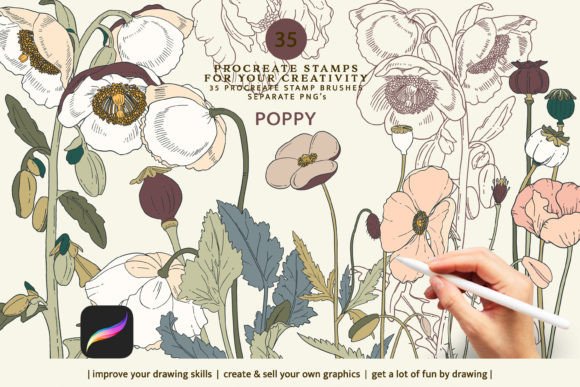
The core value of The poppy stamp brush set for Procreate lies in its efficiency. Unlike traditional painting brushes that require building up texture and shape stroke by stroke, these stamps generate complete botanical elements instantly. The set includes 35 distinct Procreate stamps, allowing for a wide variety of compositions. Additionally, it provides 35 .png images of all brush stamps with transparent backgrounds. This dual format is crucial because it acknowledges that not every user works exclusively within the Procreate ecosystem, nor does every project require a live brush.
It is important to note the technical limitations upfront. The brush set functions exclusively within the Procreate app on the iPad. It is not compatible with Photoshop, Clip Studio Paint, or desktop-based software. However, the inclusion of high-resolution .png files ensures that users without an iPad or those who prefer desktop workflows can still utilize the artistic assets. These transparent images can be dragged and dropped into virtually any design software, maintaining their utility across different platforms.
Why Different Creators Choose Digital Stamps
The appeal of Poppy Stamps, Procreate Brushes varies significantly depending on the user’s experience level and professional goals. What serves as a time-saving shortcut for a seasoned designer might act as a confidence-building scaffold for a beginner. Understanding these differing priorities helps in evaluating whether this tool is a worthwhile addition to your digital toolkit.
For Beginners and Hobbyists
For those new to digital art, the blank canvas can be intimidating. Drawing realistic flowers requires a strong understanding of anatomy, light, and perspective. Procreate brushes that function as stamps remove the barrier of technical execution. A hobbyist can focus on composition and color theory without getting frustrated by shaky lines or incorrect petal shapes. This allows beginners to create polished-looking artwork early in their learning journey, which can be highly motivating. The ability to customize size, opacity, and color means that even with a pre-made shape, the final output can feel unique and personal.
For Professional Designers and Freelancers
Time is money for freelancers and small business owners. A graphic designer creating a suite of wedding stationery may need to produce dozens of variations on a floral theme. Hand-drawing each variation is impractical. Using Poppy Stamps, Procreate Brushes allows professionals to generate base elements rapidly, which can then be tweaked, layered, and colored to match a client’s brand palette. The consistency provided by the stamps ensures that the design language remains cohesive across multiple pages or products. Furthermore, the commercial viability of these assets means that designers can deliver high-end results within tighter deadlines, improving their profit margins.
For Educators and Content Creators
Educators teaching digital art often look for tools that demonstrate principles of layering and blending modes. These stamps serve as excellent teaching aids. An instructor can show students how changing the opacity of a stamp creates depth, or how overlapping different floral elements builds complexity. Similarly, bloggers and social media marketers who need to produce daily visual content can use these brushes to add decorative flair to quotes, announcements, or product mockups. The speed of implementation allows for a consistent posting schedule without sacrificing aesthetic quality.
Practical Applications and Workflow Integration
To get the most out of The poppy stamp brush set for Procreate, it is helpful to view the stamps not as finished illustrations, but as raw materials. Here is how different users might integrate them into their projects:
- Pattern Design: Surface pattern designers can use the 35 unique stamps to create seamless repeats. By rotating and recoloring the stamps, a simple set can generate endless textile or wallpaper patterns.
- Digital Planning: Users of digital planners can import the .png files to create custom stickers or dividers. The transparent background ensures they blend seamlessly with planner templates.
- Photo Manipulation: Photographers can overlay the floral stamps onto portraits or landscape photos to add a dreamy, ethereal quality. Adjusting the blend mode to "Screen" or "Overlay" can integrate the stamps naturally with the underlying image.
- Branding Elements: Small business owners can use the stamps to create logo accents or packaging designs. The botanical theme works well for brands in the wellness, beauty, or organic food sectors.
Evaluating Quality and Flexibility
When assessing digital assets, flexibility is often more valuable than quantity. While this set includes 35 stamps, their true power comes from customization. Users are not locked into the default black or white appearance. By utilizing Procreate’s color picker and adjustment layers, a single stamp can be transformed to look like a watercolor wash, a bold vector graphic, or a subtle pencil sketch. This versatility extends the lifespan of the product, preventing it from feeling repetitive after initial use.
However, potential buyers should manage their expectations regarding the "colored images" note. The set does not include pre-colored versions of the stamps. This is actually a benefit for serious creators, as it allows for complete creative control, but it may be a drawback for those seeking instant, ready-to-use colorful clipart. The requirement to color the stamps yourself means that some foundational knowledge of digital coloring techniques will enhance the user experience.
Making the Right Choice for Your Needs
Deciding whether to invest in Poppy Stamps, Procreate Brushes depends on your current toolset and creative objectives. If you are an iPad user who frequently incorporates botanical elements into your work, this set offers a significant efficiency boost. It bridges the gap between hand-drawn authenticity and digital precision. For desktop-only users, the value lies solely in the .png files, so ensure your preferred software handles transparent images well.
Ultimately, these tools are about enhancing creativity rather than replacing it. They provide a foundation upon which artists can build, experiment, and refine. Whether you are a marketer looking to elevate your brand visuals or a hobbyist seeking a relaxing creative outlet, understanding the capabilities and limitations of these brushes will help you integrate them effectively into your artistic practice. By focusing on how these assets can solve specific problems—such as speed, consistency, or technical difficulty—you can make an informed decision that supports your long-term creative goals.