Stars Sparkles Procreate Stamp Brushes: A Complete Guide to Efficient Digital Illustration
In the fast-paced world of digital illustration, efficiency is often just as valuable as artistic talent. Whether you are a professional graphic designer working on tight deadlines or a hobbyist looking to enhance your digital journaling, the tools you choose can significantly impact your workflow. One such tool that has gained considerable attention among iPad artists is the Stars Sparkles Procreate Stamp Brushes set. This collection offers a streamlined approach to adding celestial and decorative elements to your artwork, removing the tediousness of hand-drawing repetitive shapes while maintaining creative control.
This article explores the functionality, benefits, and practical applications of this brush set, helping you determine if it is the right addition to your digital toolkit.
Understanding the Core Functionality
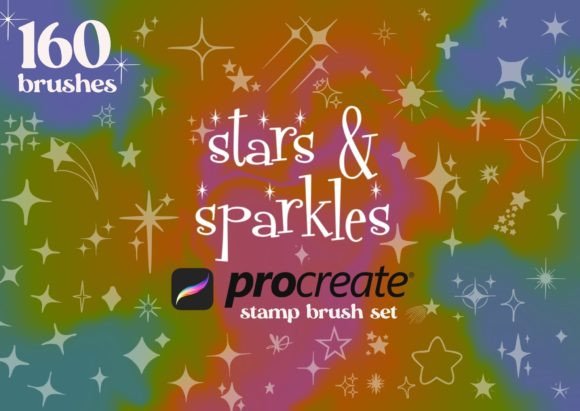
At its heart, this product is not a traditional painting brush that simulates texture or pressure sensitivity in the conventional sense. Instead, it operates as a stamping system. The collection includes 160 stars and sparkles procreate stamps, providing a vast library of pre-designed shapes. These range from simple five-pointed stars to complex, whimsical sparkle clusters.
The mechanism is straightforward yet powerful. You select a specific brush from the library, adjust the size to fit your composition, and tap or drag across your canvas to place the shape. Because these are vector-based or high-resolution raster stamps within the Procreate environment, they remain crisp regardless of scaling. This simplicity allows artists to bypass the time-consuming process of sketching perfect geometric shapes or intricate light effects manually.
Key Features and Characteristics
To truly appreciate the value of this tool, it is essential to look at what makes it distinct from standard brush packs. The versatility lies in the variety and customization options provided:
- Extensive Variety: With 160 different shapes, the set covers a wide aesthetic spectrum. You will find solid filled stars, delicate outlines, four-pointed glints, and abstract sparkle bursts.
- Full Customization: Unlike static stickers, these brushes integrate seamlessly with Procreate’s color engine. You can recolor every single stamp instantly, allowing them to match any palette or mood board.
- Scalability: Each stamp can be resized from tiny, subtle accents to large, dominant focal points without losing quality.
- Ease of Use: The learning curve is virtually non-existent. If you know how to select a brush and tap the screen, you can use this tool effectively.
Why Artists Choose Stamp Brushes Over Manual Drawing
One might ask, why use a stamp when drawing a star is relatively simple? The answer lies in consistency and volume. When creating backgrounds, patterns, or magical effects, an artist often needs dozens, if not hundreds, of small elements. Drawing each one by hand can lead to fatigue and inconsistency in shape and size.
Using Stars Sparkles Procreate Stamp Brushes ensures that every element is perfectly formed. This is particularly useful for filling negative spaces. In composition theory, negative space is the area around and between the subject(s) of an image. Leaving it completely empty can sometimes make a piece feel unfinished. Adding subtle sparkles or small stars helps balance the visual weight of the artwork, guiding the viewer’s eye and adding depth without cluttering the main subject.
Furthermore, certain shapes, like complex lens flares or multi-layered sparkles, are technically challenging to draw quickly. These stamps provide instant access to professional-grade lighting effects that would otherwise require advanced layering and blending techniques.
Practical Applications Across Industries
The utility of this brush set extends beyond casual doodling. Various professionals and creators can leverage these tools to enhance their output.
Digital Planners and Journaling
Digital planning has surged in popularity, with users creating elaborate layouts on tablets. For these users, aesthetics are paramount. The outline stars and subtle sparkles are perfect for highlighting important dates, decorating headers, or adding a touch of whimsy to daily logs. The ability to recolor means the decorations can always align with the user’s monthly theme.
Greeting Card and Invitation Design
For freelance designers creating wedding invitations, birthday cards, or holiday greetings, time is money. The 160 stars and sparkles procreate stamps allow for rapid prototyping of decorative borders and backgrounds. Filled stars work well for bold, celebratory designs, while delicate outlines suit elegant, minimalist invitations.
Social Media Content Creation
Influencers and social media managers often need to create eye-catching graphics quickly. Adding sparkles to product photos, quote cards, or story backgrounds can increase engagement by making the content visually popping. The ease of stamping allows for quick iteration, enabling creators to test different layouts in minutes rather than hours.
Children’s Book Illustration
Illustrators working on children’s books often incorporate magical themes. Night skies, fairy dust, and magical wands require numerous star elements. Using a stamp brush ensures that the background elements remain consistent, allowing the illustrator to focus more energy on character design and narrative storytelling.
Evaluating Suitability: Is This Tool Right for You?
While the benefits are clear, it is important to consider whether this tool fits your specific workflow. Here are some factors to evaluate:
- Style Compatibility: If your art style is highly organic, rough, or textured, perfectly geometric stars might look out of place. However, many sets include varied shapes that can blend better with looser styles.
- Project Scale: For a single, small illustration, manual drawing might be faster than browsing a library. For larger projects with repetitive elements, the stamp brush saves significant time.
- Desire for Control: Some purists prefer drawing every line themselves. If you enjoy the meditative process of drawing stars, this tool might remove some of that joy. However, for those who view decoration as a means to an end, this tool is invaluable.
Tips for Maximizing Value
To get the most out of your Stars Sparkles Procreate Stamp Brushes, consider these best practices:
Layer Management: Always stamp on a new layer. This allows you to move, resize, or delete individual stars without affecting the rest of your artwork. It also enables you to apply global adjustments, such as opacity changes or blur effects, to all sparkles at once.
Color Harmony: Don’t just use white or yellow. Experiment with pastel pinks, deep blues, or even neon greens. Changing the color mode of the layer (e.g., to "Add" or "Screen") can create glowing effects that mimic real light sources.
Mixing Shapes: Avoid using only one type of star. Combine large filled stars with tiny outline sparkles to create depth and interest. This variation mimics how light reflects differently off various surfaces, making your design look more dynamic.
Limitations and Considerations
No tool is without its limitations. Since these are pre-made shapes, there is a risk of your artwork looking generic if you rely on them too heavily without modification. To avoid this, rotate your stamps, vary their opacity, and combine them with hand-drawn elements. Additionally, while 160 shapes is a generous amount, niche projects might require specific astronomical accuracy that general sparkle brushes do not provide.
It is also worth noting that while these brushes make adding details quick, they do not replace fundamental design skills. Understanding composition, color theory, and balance is still crucial to ensuring that the added sparkles enhance rather than distract from your main subject.
Conclusion
The Stars Sparkles Procreate Stamp Brushes represent a practical solution for modern digital creators seeking efficiency without sacrificing quality. By offering 160 versatile, customizable shapes, this tool simplifies the process of adding decorative elements, filling negative spaces, and creating magical effects. Whether you are designing invitations, planning your week, or illustrating a fantasy scene, these brushes can help your work pop with minimal effort.
Ultimately, the value of this tool lies in its ability to handle the tedious aspects of decoration, freeing you to focus on creativity and storytelling. As with any digital asset, its effectiveness depends on how thoughtfully it is integrated into your workflow. When used with intention and combined with strong design principles, these stamp brushes can become an indispensable part of your Procreate arsenal.