Top 30 Procreate Drawing Brushes
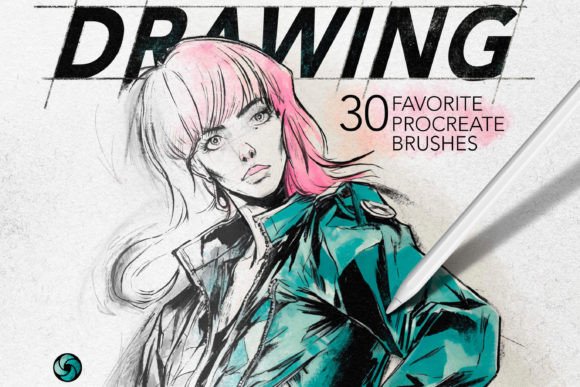
Digital art can feel overwhelming when you are staring at a blank canvas with hundreds of default tools at your disposal. Many artists, whether they are seasoned professionals or enthusiastic beginners, often find themselves stuck in "tool paralysis." This is where a curated set of Favorite Drawing Procreate Brushes becomes an invaluable asset. Instead of spending hours tweaking settings to get the right texture or line weight, you can dive straight into creating. This specific collection offers a streamlined solution by providing thirty handpicked brushes that cover the most essential artistic needs, along with five bonus seamless paper textures to add depth and realism to your work.
Why Curated Brush Sets Matter for Your Workflow
The primary appeal of this brush pack lies in its simplicity and versatility. When you download a massive library containing thousands of brushes, you often end up using only a handful of them regularly. The rest just clutter your interface. By focusing on a select group of thirty favorites, this set eliminates the noise. It includes a diverse range of tools such as sketch brushes, painting brushes, pencil brushes, dry brushes, wet brushes, sponge brushes, blenders, brush pens, and Procreate markers. Each tool has been tested and selected for its reliability and aesthetic quality.
For beginners, this means you do not need to understand the complex engineering behind brush dynamics to achieve professional results. For professionals, it means faster workflow efficiency. You spend less time searching for the right tool and more time focusing on composition, color theory, and storytelling. The inclusion of blenders and texture brushes further enhances this utility, allowing for smooth gradients and organic backgrounds without leaving the app.
Exploring the Versatility of the Collection
One of the standout features of this listing is the variety packed into a concise number of tools. Let us look at how these different categories serve distinct creative purposes:
- Sketch and Pencil Brushes: These are ideal for the initial stages of any project. They mimic the friction and grain of traditional graphite, making them perfect for concept art, character design, or quick ideation sessions.
- Wet and Dry Brushes: Painting brushes often struggle to replicate the unpredictability of real media. Wet brushes in this set allow for beautiful blending and color mixing, similar to watercolors or oils, while dry brushes provide texture and roughness, excellent for adding grit to landscapes or portraits.
- Markers and Brush Pens: These tools are fantastic for illustrators who enjoy bold lines and flat colors. They are particularly useful for fashion illustration, comic book art, and graphic design elements where clean edges are required.
- Sponge and Texture Tools: Often overlooked, sponge brushes can create unique patterns and soft edges that are difficult to achieve with standard round brushes. They add an organic feel to digital pieces, breaking up the "too perfect" look that sometimes plagues digital art.
The five bonus seamless paper textures are a significant addition. Textures can make or break a digital piece. By applying these seamless patterns, you can give your artwork a tactile quality, making it look like it was created on high-quality watercolor paper or rough cardboard. This is especially useful for creators who want their digital prints to have a traditional art feel.
Practical Applications for Different Creators
The utility of these Favorite Drawing Procreate Brushes extends beyond fine art. Here is how different users can integrate them into their daily routines:
Entrepreneurs and Small Business Owners: If you run an online shop or a brand, you likely need custom graphics for social media posts, packaging, or logos. Using the marker and sketch brushes, you can create hand-drawn elements that stand out against generic stock photos. The seamless textures can serve as elegant backgrounds for product showcases.
Educators and Bloggers: Visual aids are crucial for engagement. Teachers can use the pencil and sketch brushes to create clear, handwritten-style diagrams for lessons. Bloggers can use the painting brushes to create unique header images that reflect their personal brand identity, ensuring their content looks cohesive and professional.
Hobbyists and Casual Users: For those who draw for relaxation, the ease of use is paramount. The blenders and wet brushes allow for satisfying, meditative coloring experiences. You do not need formal training to create something beautiful with these intuitive tools.
Important Considerations Before You Start
While this brush set is designed to be user-friendly, there are a few technical details to keep in mind to ensure a smooth experience. First and foremost, compatibility is key. These brushes are engineered specifically for Procreate on the iPad. They will not work on Procreate Pocket for iPhone, nor will they function in other drawing applications like Photoshop or Clip Studio Paint. Ensure you have an iPad that supports the latest version of Procreate to take full advantage of the brush engine capabilities.
Another consideration is the learning curve associated with digital pressure sensitivity. While the brushes are pre-configured for optimal performance, your individual drawing style may require minor adjustments. For instance, if you press lightly, some sketch brushes may appear too faint. Do not hesitate to experiment with the opacity and size settings within Procreate to tailor the tools to your hand pressure. This customization is part of the joy of digital art.
Additionally, remember that brushes are tools, not substitutes for fundamental skills. While they can enhance your work, understanding light, shadow, and anatomy will always be the foundation of great art. Use these brushes to accelerate your process, but continue to study and practice your craft.
Simple Installation Process
Getting started with your new tools is straightforward. The developers have prioritized a hassle-free setup so you can begin creating immediately. After purchasing the listing, you will receive a download link for the file. Follow these simple steps:
- Download the file to your iPad.
- Open the downloaded file directly through the Procreate app.
- The brush set will automatically install and appear in your brush library.
This automatic installation feature saves time and reduces technical frustration. Once installed, the brushes are ready to use. You can organize them into your own folders if you wish, or keep them in their default arrangement for easy access.
In conclusion, investing in a high-quality, curated set of Favorite Drawing Procreate Brushes is a smart move for any digital artist looking to refine their toolkit. By offering a balanced mix of sketching, painting, and texturing tools, this collection supports a wide range of artistic styles and professional needs. Whether you are designing a logo, illustrating a children's book, or simply doodling for fun, these thirty brushes plus five texture bonuses provide the reliability and versatility needed to bring your creative visions to life.