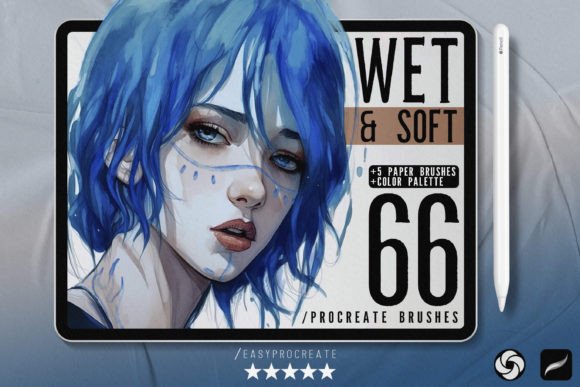
66 Wet Soft Procreate Brushes for Digital Art
Digital illustration often struggles to capture the organic unpredictability of traditional media. The sterile perfection of a standard digital pen can leave artwork feeling flat or overly processed. This is where the 66 Wet Soft Procreate Brushes collection changes the game. Designed for artists who crave texture, depth, and natural flow, this toolkit bridges the gap between tactile tradition and digital convenience. Whether you are illustrating children’s books, designing concept art, or simply sketching daily ideas, these brushes provide the nuanced control necessary to elevate your work from good to exceptional.
Why Texture Matters in Digital Illustration
Texture is not just an aesthetic choice; it is a storytelling tool. In traditional media, the tooth of the paper, the bleed of the ink, and the opacity of the paint all contribute to the mood of a piece. Digital tools often strip these elements away, resulting in images that look too clean. The 66 Wet Soft Procreate Brushes reintroduce these subtle imperfections. By simulating wet edges, soft blends, and paper grain, they allow your digital canvas to breathe. This authenticity helps viewers connect with the art on a deeper, more emotional level, as it mimics the visual language of handcrafted works they are familiar with.
Breaking Down the Toolkit
This comprehensive set is not a random assortment of tools but a curated system designed to handle every stage of the artistic process. Understanding how each category functions allows you to build a more efficient workflow.
- 9 Liner and Sketch Brushes: Precision is key in the early stages. These brushes are optimized for outlining and intricate linework. They offer varying degrees of pressure sensitivity, allowing for dynamic line weight that mimics pencil or fine-liner pens.
- 16 Marker Brushes: Markers are beloved for their vibrant, layered looks. This selection captures the distinct stroke characteristics of alcohol-based markers, including the subtle streaks and overlapping transparency that define the medium.
- 23 Soft Brushes: The core of any painterly workflow. These brushes excel at blending and shading, providing smooth gradients without the muddy results often associated with digital smudging tools.
- 14 Special Textured Brushes: These add character. From rough charcoal effects to watercolor blooms, they introduce unique surface qualities that break up uniformity.
- 4 Blender Brushes: Essential for seamless transitions. These tools allow you to merge colors naturally, creating soft shadows and highlights that feel integrated rather than painted on top.
- 5 Seamless Paper Texture Brushes: As a bonus, these overlays give your final piece an authentic substrate feel, grounding the digital image in reality.
Practical Applications for Different Creators
The versatility of the 66 Wet Soft Procreate Brushes means they serve a wide range of creative professionals. Here is how different users can adapt this set to their specific goals.
For Illustrators and Concept Artists
Concept art requires speed and atmosphere. Use the Soft Brushes to block in large shapes and lighting scenarios quickly. The wet edges help define forms without hard lines, keeping the focus on mood and composition. When refining details, switch to the Liner Brushes for crisp architectural elements or character features. The ability to toggle between loose painting and precise drawing within the same ecosystem streamlines the iterative design process.
For Graphic Designers and Marketers
In commercial design, standing out is crucial. Standard vector graphics can sometimes feel cold. Incorporating the Marker Brushes into social media graphics or blog headers adds a human touch that resonates with audiences. You can create hand-lettered quotes or organic background elements that feel approachable and trendy. The Seamless Paper Texture Brushes are particularly useful here, allowing you to add a subtle vintage or craft aesthetic to digital ads, making them feel less like corporate collateral and more like personal recommendations.
For Educators and Hobbyists
If you are teaching digital art or learning it yourself, having a reliable set of tools reduces friction. Beginners often get bogged down trying to configure brush settings. With the 66 Wet Soft Procreate Brushes, the settings are pre-optimized for intuitive use. Educators can demonstrate traditional techniques, such as cross-hatching with the liner brushes or glazing with the soft brushes, helping students understand fundamental art principles in a digital environment.
Techniques for Maximizing Potential
Owning the brushes is only the first step. To truly benefit from this collection, consider these practical approaches to your workflow.
Layering for Depth: Do not rely on a single brush type. Start with the Special Textured Brushes to lay down a base tone. Use the Soft Brushes to build mid-tones, and finish with the Marker Brushes for sharp accents. This layering technique mimics traditional painting methods and creates a rich, complex visual surface.
Using Blenders Wisely: The included Procreate Blender Brushes are powerful but should be used sparingly. Over-blending can remove the texture that makes these brushes special. Instead, use them to soften specific edges where light hits a form, leaving other areas slightly rougher to maintain visual interest.
Integrating Paper Textures: Apply the Seamless Paper Texture Brushes on a separate layer at the top of your stack. Set the blending mode to "Multiply" or "Overlay" at low opacity. This unifies the entire piece, making disparate elements feel like they exist on the same physical page.
Maintaining Consistency and Originality
While presets provide a great starting point, originality comes from how you combine them. Avoid using the same three brushes for every project. Challenge yourself to explore the less obvious options in the set, such as the specialized textured tools. Keep your file organization clear by naming layers according to the brush type used, which helps when revisiting projects for edits or client feedback.
Furthermore, remember that these brushes are tools, not crutches. Your understanding of light, color theory, and composition remains the most critical factor in your art’s success. The 66 Wet Soft Procreate Brushes simply remove the technical barriers, allowing your artistic intent to shine through without fighting against the software.
Final Thoughts on Elevating Your Artistry
Digital art is constantly evolving, but the desire for human connection through texture and imperfection remains constant. The 66 Wet Soft Procreate Brushes offer a robust solution for artists seeking to infuse their digital work with warmth and realism. By integrating these tools into your daily practice, you open up new avenues for expression, whether you are creating detailed illustrations, engaging marketing materials, or personal sketches. Embrace the wet edges, enjoy the soft blends, and let your creativity flow with the confidence that your tools are working with you, not against you.