Charcoal Brushes for Procreate: Bringing Traditional Texture to Digital Art
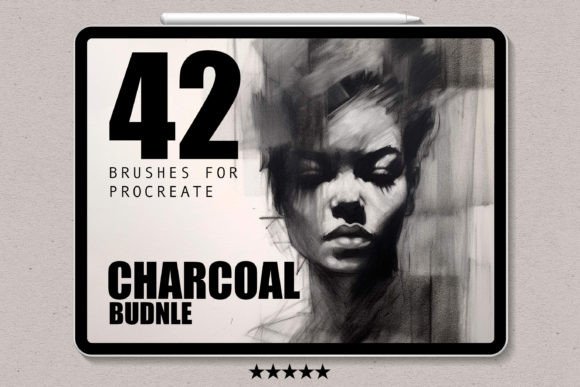
There is a distinct, tactile satisfaction in drawing with real charcoal. The way the stick crumbles slightly against the tooth of the paper, the smudge of graphite on your palm, and the dramatic contrast between deep blacks and soft grays create an emotional connection to the artwork that is hard to replicate. For years, digital artists have struggled to bridge this gap, often settling for smooth, sterile lines that lack the organic imperfection of traditional media. This is where Charcoal Brushes for Procreate change the game. These tools are not just about mimicking a look; they are about capturing the behavior and authenticity of physical charcoal within the iPad ecosystem.
Whether you are a seasoned illustrator looking to expand your stylistic range or a beginner eager to explore shading without the mess of actual soot, these brushes offer a versatile solution. They allow you to create stunning works of art with ease, providing the depth and dimension that flat digital colors often miss. From bold, broad strokes that define a composition’s structure to delicate, whisper-thin lines for intricate details, this digital set covers the full spectrum of charcoal expression.
Why Digital Charcoal Matters for Modern Creators
The primary advantage of using Charcoal Brushes for Procreate lies in the balance between control and chaos. Traditional charcoal is unforgiving. Once you press too hard, the paper fibers can become saturated, making corrections difficult. In Procreate, you retain the ability to undo, layer, and adjust opacity, but the brush engine ensures you don’t lose the gritty, authentic texture that makes charcoal drawings so compelling. This hybrid approach is invaluable for professionals who need to meet tight deadlines without sacrificing artistic integrity.
Consider the workflow of a concept artist working on character designs. They need to convey mood, lighting, and form quickly. Using these brushes, they can block out shadows with wide, aggressive strokes and then refine facial features with sharper edges, all while maintaining a cohesive, hand-drawn aesthetic. The result is a piece that feels alive and spontaneous, rather than over-polished and rigid. This authenticity resonates with audiences who are increasingly drawn to art that feels human-made, even when it is created on a screen.
Real-World Applications Across Different Fields
The versatility of these brushes extends far beyond fine art illustrations. Here is how different users can integrate them into their daily workflows:
- Educators and Tutors: Teachers creating digital handouts or video lessons can use charcoal brushes to highlight key concepts. The rough texture draws the eye naturally, making annotations feel like personal notes rather than cold, typed text. It adds a layer of warmth to educational materials.
- Interior Designers and Architects: When presenting initial sketches to clients, hyper-realistic 3D renders can sometimes feel intimidating or final. A sketch rendered with digital charcoal feels exploratory and inviting, encouraging client feedback and collaboration during the early stages of a project.
- Social Media Content Creators: In a feed saturated with high-gloss photography, a hand-drawn quote or illustration stands out. Using these brushes allows bloggers and influencers to create unique thumbnails and story elements that reflect their personal brand’s artistic side.
- Storyboard Artists: Speed and clarity are essential in storyboarding. The ability to quickly lay down dark values and erase highlights mimics the traditional storyboard process, helping directors visualize lighting and composition without getting bogged down in color theory.
Choosing the Right Approach for Your Skill Level
One of the most appealing aspects of this brush set is its accessibility. If you are just starting out, you might worry that replicating traditional techniques requires years of practice. However, these brushes are designed to be intuitive. The pressure sensitivity of the Apple Pencil works in tandem with the brush settings to do much of the heavy lifting. A light touch yields a soft, dusty gray, while pressing harder produces a rich, opaque black. This responsiveness allows beginners to focus on composition and form rather than fighting with the tool.
For advanced users, the value lies in customization and layering. You can combine the charcoal brushes with other Procreate features, such as blending modes and clipping masks, to create complex textures. For instance, laying a charcoal sketch over a watercolor background can create a mixed-media effect that is popular in contemporary book covers and editorial illustrations. The key is to experiment with opacity and flow settings to find the sweet spot that matches your personal style.
Practical Considerations Before You Start
Before downloading and diving in, there are a few practical matters to keep in mind to ensure a smooth experience. First, remember that these brushes are optimized specifically for Procreate on the iPad. They will not function in Photoshop, Clip Studio Paint, or other desktop software. This specificity ensures that the brush engine interacts correctly with the iPad’s touch interface and pressure sensors, delivering the promised performance.
Installation is straightforward but requires attention to detail. After purchase, you will receive a download link. It is crucial to open this file directly on your iPad via the Procreate app. The process is automated: once you tap the file, Procreate recognizes the format and installs the brush set into your library. If you encounter any issues, such as the brushes not appearing or behaving erratically, checking your Procreate version is a good first step. Most developers provide support for installation problems, so do not hesitate to reach out if you get stuck.
Another consideration is hardware. While Procreate runs on various iPad models, the nuance of charcoal drawing benefits significantly from the precision of the Apple Pencil. The tilt function, in particular, allows you to shade with the side of the "stick," just as you would with real charcoal. Without this feature, you may find it harder to achieve those broad, sweeping gradients that define the medium.
Maximizing Your Creative Potential
To truly let your artistic talent shine, treat these brushes as a partner in your creative process rather than just a tool. Start by experimenting with different paper textures within Procreate. The interaction between the charcoal brush and a rough canvas texture differs vastly from a smooth one. Try layering multiple strokes to build up density, or use the eraser tool, which often acts like a kneaded eraser in traditional drawing, lifting pigment to create highlights.
Remember, the goal is not perfect replication but emotional resonance. Use the bold strokes to convey energy and movement, and the delicate lines to invite closer inspection. Whether you are drafting a quick idea or finishing a polished portfolio piece, these brushes provide the flexibility to adapt to your needs. They remove the barriers of cleanup and material costs, allowing you to focus entirely on the act of creation.
In a digital world that often prioritizes speed and perfection, there is immense value in tools that bring back the human touch. Charcoal Brushes for Procreate offer a bridge between the old and the new, giving you the freedom to explore depth, shadow, and texture without leaving your desk. By integrating these tools into your workflow, you open up new possibilities for expression, ensuring that your digital art retains the soul and spontaneity of traditional drawing.