Master Realistic Textures with Animal Fur 2 Brushes
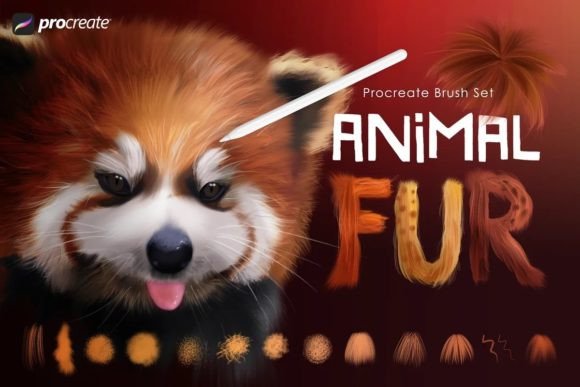
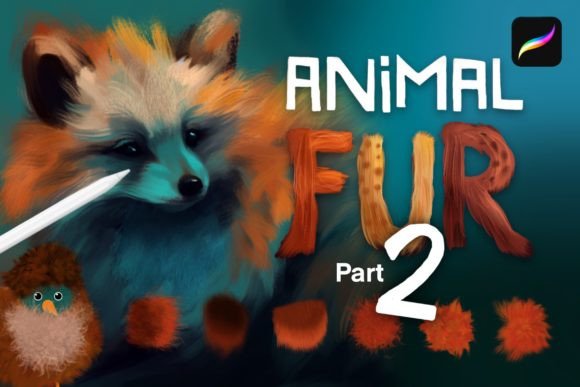
Digital illustration often hits a wall when artists attempt to render organic textures. Hair, fur, and feathers are notoriously difficult to paint because they require a delicate balance between chaotic detail and cohesive form. Many creators spend hours manually painting individual strands, only to end up with results that look stiff or artificial. This is where Animal Fur 2 - Procreate Brushes changes the workflow entirely. Designed as a robust companion to its predecessor, this collection offers thirty-five high-quality dynamic tools that streamline the creation of fluffy, fuzzy, and feathery surfaces without sacrificing artistic control.
The value of this set lies not just in the quantity of brushes, but in their versatility. Whether you are illustrating a hyper-realistic wolf, a stylized cartoon character, or a fantastical creature born from imagination, these brushes adapt to your specific aesthetic. They are engineered to work seamlessly within the Procreate ecosystem, allowing you to build depth, texture, and volume with intuitive strokes.
Beyond Basic Texture: A Toolkit for Diverse Styles
One of the most common misconceptions about texture brushes is that they lock you into a single visual style. Animal Fur 2 defies this limitation by offering a varied range of effects. The set includes brushes designed for smooth, realistic fur, which are ideal for wildlife illustrations where anatomical accuracy is paramount. These tools lay down hair in natural clumps, mimicking how light interacts with dense coats.
Conversely, if your project leans toward animation or children’s book illustration, the set provides brushes with a distinct cartoon style. These allow for cleaner lines and more exaggerated fluffiness, helping characters feel approachable and expressive. Perhaps the most innovative inclusion is the dual-color Kate brushes. These unique tools enable you to introduce secondary tones instantly, creating immediate depth and variation that would otherwise require multiple layers and careful color picking. This feature is particularly useful for adding warmth to shadows or highlights to tips of fur, giving your work a professional finish with less effort.
Techniques for Depth and Realism
Owning the right tools is only half the battle; knowing how to wield them determines the quality of your output. To get the most out of Animal Fur 2 - Procreate Brushes, it is essential to move beyond simple painting. The true magic happens when you combine painting with smudging. Using these brushes as smudge tools allows you to blend edges softly, eliminating the harsh digital look that often plagues beginner illustrations. By building up your image layer by layer, you can create a sense of volume that feels tangible.
Start with the included base brushes to block in the general shape and mass of your subject. Do not worry about details at this stage. Focus on the silhouette and the direction of hair growth. Once the foundation is set, switch to the detailed fur brushes. Work in small sections, following the natural flow of the anatomy. For an even richer effect, experiment with layer blend modes. Setting a layer to Overlay or Multiply can deepen shadows and enhance the richness of the colors, giving the fur a luminous quality. This technique adds complexity without muddying the underlying colors.
Applications for Birds and Fantasy Creatures
While the name suggests a focus on mammals, this brush set is equally powerful for avian subjects. Feathers share many structural similarities with fur, particularly in how they overlap and catch light. The dynamic nature of these brushes allows you to render everything from the soft down of a chick to the sleek, aerodynamic feathers of a hawk. When working on birds, use lighter, quicker strokes to mimic the delicate structure of plumage. The variation in brush opacity helps create the translucent effect seen in wing tips.
Fantasy art also benefits immensely from this toolkit. Creating creatures that do not exist in reality requires a grounding in real-world physics to make them believable. Whether you are designing a dragon with scaled hide and tufted mane or a mythical beast with iridescent coat patterns, Animal Fur 2 provides the textural foundation needed to sell the illusion. The ability to mix realistic and stylized brushes means you can tailor the creature’s appearance to fit the tone of your narrative, whether it is dark and gritty or whimsical and bright.
Practical Workflows for Different Creators
Different professionals can integrate these brushes into their workflows in unique ways. For concept artists working in gaming or film, speed is crucial. These brushes allow for rapid iteration of creature designs, enabling artists to explore multiple variations of a character’s appearance in a fraction of the time it would take to paint manually. Marketing designers creating mascot logos can use the cartoon-style brushes to add friendly, tactile appeal to brand characters, making them more memorable to audiences.
Educators and hobbyists will find the learning curve gentle. The brushes are intuitive, reducing the technical barrier to entry for complex textures. This allows students to focus on composition and color theory rather than getting bogged down in tedious detailing. Freelancers can use the consistency of the brushes to maintain a cohesive style across multiple projects, ensuring that their portfolio looks polished and professional. By standardizing their texture workflow, they can deliver high-quality results faster, improving client satisfaction and turnaround times.
Keeping Your Art Organized and Effective
To ensure your final pieces remain clear and impactful, organization is key. When using thirty-five different brushes, it is easy to become overwhelmed. Create a custom palette in Procreate with your top five to ten favorites from the set for quick access. Keep the rest archived but available for specific needs. Always name your layers clearly, distinguishing between base shapes, mid-tone fur, and highlight details. This non-destructive approach allows you to tweak individual elements without redoing the entire piece.
Consistency in lighting is also vital. No matter how realistic the fur texture is, it will look flat if the light source is inconsistent. Use the dual-color brushes to reinforce your lighting scheme, ensuring that highlights and shadows align with your established light direction. This attention to detail separates amateur work from professional-grade illustration.
In a digital landscape saturated with generic assets, Animal Fur 2 - Procreate Brushes stands out as a specialized tool for serious creators. It empowers you to fight tooth and claw for artistic excellence, providing the technical support needed to bring your inner animal to life. Whether you are refining a portfolio piece or experimenting with new styles, this set offers the flexibility and quality required to elevate your digital art. Embrace the texture, experiment with the blends, and let your creativity run wild.