Mastering Manga Style: A Practical Review of the Awesome Manga Procreate Brushes Collection
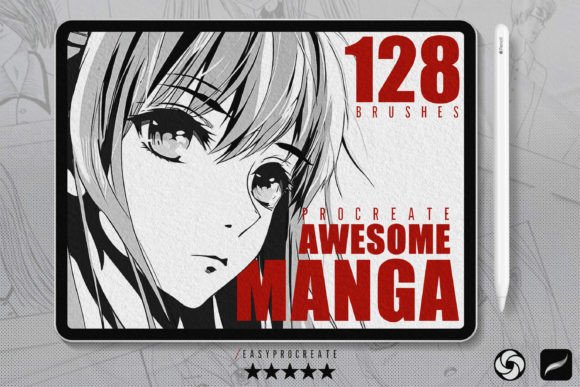
Digital illustration has democratized the creation of manga and anime art, yet achieving that authentic, hand-drawn aesthetic remains a significant technical hurdle for many artists. The gap between a generic digital drawing and a polished manga page often lies in the texture, line weight variability, and specific shading techniques used. This is where specialized toolsets like Awesome Manga Procreate Brushes enter the workflow. Rather than relying on standard round brushes and manual texture overlays, this collection offers a curated suite of 128 tools designed to replicate traditional ink and screen-tone effects directly within the iPad ecosystem.
For illustrators, comic creators, and hobbyists evaluating their digital toolkit, understanding the composition and utility of such a bundle is essential. It is not merely about having more brushes; it is about having the right instruments for specific stages of the manga production pipeline, from initial sketching to final halftone application.
Deconstructing the Toolkit: Function Over Quantity
The value of any brush pack is determined by how well its components address the distinct phases of artistic creation. The Awesome Manga Procreate Brushes set is structured around five core categories, each targeting a specific technical challenge in manga production.
Precision Line Work and Sketching
The foundation of manga is the line. This collection includes 39 sketch and line brushes, which is a substantial portion of the total set. In practice, this variety allows artists to move beyond a single "ink" brush. You might use a pressure-sensitive G-pen emulation for dynamic character outlines while switching to a rougher pencil texture for background elements or initial thumbnails. The distinction here is control; these brushes are engineered to minimize jitter and provide smooth, confident strokes, which is critical when drawing long, sweeping hair lines or intricate mechanical details.
Specialized Character Details
Drawing hair is notoriously difficult in digital media due to the need for both flow and strand definition. The inclusion of 5 dedicated manga hair brushes addresses this niche pain point. Instead of manually painting every strand, these brushes allow for rapid blocking of volume and texture. However, they are best viewed as accelerators rather than replacements for fundamental anatomy knowledge. They work best when an artist understands the underlying structure of the hairstyle, using the brush to add stylistic flair efficiently.
Shading and Depth
Manga relies heavily on high-contrast shading and specific textural gradients. With 40 shader brushes, this set covers a wide spectrum from soft airbrush-style blends to hard-edged cel-shading tools. More importantly, it includes grain stipple brushes. Stippling is a traditional technique that is time-consuming to do manually but adds a sophisticated, organic feel to shadows. Having these pre-configured allows artists to experiment with depth without the tedium of manual dot placement.
The Role of Halftones and Backgrounds in Storytelling
One of the most defining visual characteristics of printed manga is the use of halftones—patterns of dots used to create gray tones and textures. Recreating this digitally can be complex if done manually. The 27 halftone brushes included in this collection aim to streamline this process. These tools are particularly useful for adding retro-style textures or indicating material properties, such as the sheen on fabric or the gradient of a sky.
When comparing this approach to using separate image assets or layer styles, brush-based halftones offer greater integration with the drawing process. You can paint the tone directly onto the canvas, allowing for immediate visual feedback and easier adjustments. However, users should note that brush-based halftones may behave differently at various zoom levels compared to vector-based patterns, requiring some experimentation to find the optimal resolution for print or web publication.
Furthermore, the set includes 13 background stamps and 8 seamless paper brushes. These elements serve a practical purpose: speed. For webcomic artists working on tight deadlines, being able to drop in a pre-made background element or apply a consistent paper texture across panels can save hours of work. The seamless paper brushes are particularly effective for unifying disparate elements, giving the entire piece a cohesive, traditional media feel that pure digital art sometimes lacks.
Evaluating Fit: Who Is This Collection For?
Deciding whether to invest in a specialized brush set like Awesome Manga Procreate Brushes requires an honest assessment of your current workflow and artistic goals. This collection is ideally suited for:
- Intermediate to Advanced Digital Artists: Those who already understand the principles of manga composition but want to reduce the technical friction of achieving specific textures.
- Webcomic Creators: Artists producing regular content who need to maintain a consistent style while maximizing efficiency.
- Traditional Artists Transitioning to Digital: Users who miss the tactile feedback of ink and paper will appreciate the textured shaders and halftone tools that mimic physical media.
Conversely, this may not be the right solution for everyone. Beginners who are still struggling with basic anatomy or perspective might find that a large brush library becomes a distraction. It is often more beneficial to master a single standard brush before exploring specialized tools. Additionally, artists who prefer a clean, modern anime style with flat colors and minimal texture may find the heavy emphasis on halftones and grain less relevant to their aesthetic.
Comparison with Alternative Approaches
When evaluating digital manga tools, it is helpful to compare specialized brush packs against other common methods.
Custom-Built Brushes vs. Pre-Made Sets
Some professionals prefer to create their own brushes from scratch, tweaking settings for pressure, streamline, and texture to match their exact hand movement. While this offers ultimate customization, it requires significant technical knowledge of Procreate’s brush engine. The Awesome Manga Procreate Brushes set offers a balanced middle ground: professionally tuned presets that work out of the box but can still be modified if needed. For most users, this saves the steep learning curve associated with brush engineering.
Vector-Based Tools vs. Raster Brushes
Applications like Clip Studio Paint are often cited as the industry standard for manga due to their robust vector line capabilities and extensive asset libraries. Procreate, while powerful, is primarily a raster-based painting app. This brush set helps bridge that gap by providing tools that emulate the precision and texture typically associated with vector-friendly environments. However, users should be aware that raster brushes do not scale infinitely like vectors. If your primary goal is large-format printing where line crispness at massive scales is critical, you may still need to consider vector-based workflows alongside these brushes.
Practical Considerations and Limitations
While the breadth of 128 brushes is impressive, quantity does not always equal quality in daily use. Most professional artists will likely settle on a "core" subset of 10–15 brushes from this collection for 90% of their work. The value lies in having the remaining tools available for specific effects, such as a unique halftone pattern for a dream sequence or a specialized hair brush for a complex character design.
It is also important to consider device performance. High-resolution texture brushes, particularly the halftones and grain shaders, can be resource-intensive on older iPad models. Artists working on larger canvases should monitor their device’s memory usage to ensure smooth stroke performance.
Ultimately, Awesome Manga Procreate Brushes represents a comprehensive resource for digitizing the manga aesthetic. It removes many of the technical barriers to achieving authentic textures and effects, allowing artists to focus more on storytelling and character design. By understanding the specific strengths of each category—from the precise line work to the atmospheric backgrounds—users can integrate these tools effectively into their workflow, enhancing both the quality and efficiency of their digital art.